
WhatPulse
What is WhatPulse?
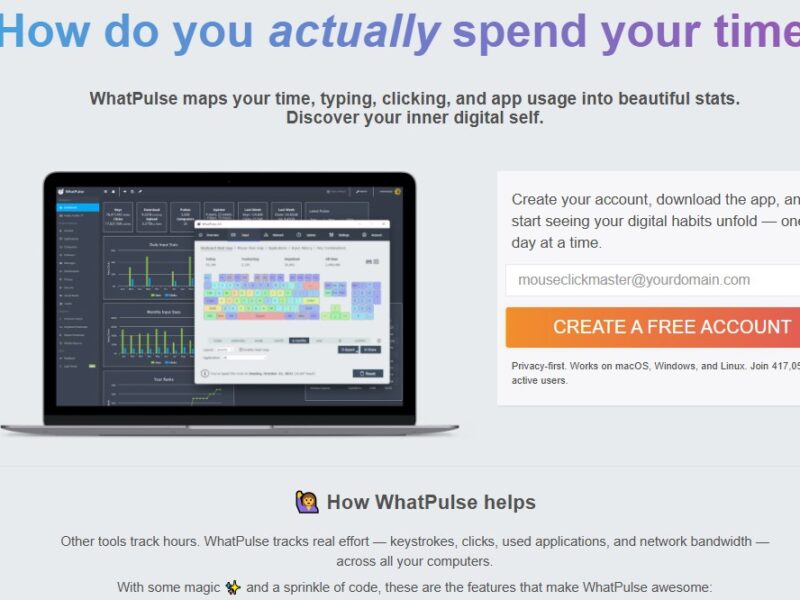
WhatPulse is a comprehensive tracking software designed to measure and analyze user activity on a computer. It allows individuals and organizations to monitor the number of keystrokes, mouse clicks, and other essential metrics to evaluate productivity and usage patterns. WhatPulse is ideal for users looking to understand their computer habits, improve work efficiency, or gain insight into their interaction with digital tools. Whether you’re a freelancer, business professional, or a gamer, WhatPulse provides data that can help optimize computer use and enhance overall productivity.
The platform offers both a free and premium version, catering to different user needs, from personal tracking to business analytics.
Features
WhatPulse offers an array of features aimed at tracking and analyzing user activity, helping both individuals and organizations optimize their computer usage.
1. Keystroke and Mouse Click Tracking
WhatPulse tracks every keystroke and mouse click you make, providing detailed insights into your activity. This feature is especially useful for understanding patterns of productivity or simply keeping a record of your digital habits.
2. Customizable Statistics
The platform allows users to view a range of statistics, including keys pressed, clicks made, and even the time spent on specific applications. You can break down this data by time periods (daily, weekly, monthly) to gain a deeper understanding of your computer usage.
3. Online Leaderboards
WhatPulse features a unique competitive element—online leaderboards. Users can see how their keystroke and click statistics compare to others globally, adding an element of fun and motivation for those looking to increase their productivity or be part of a community.
4. Detailed Activity Reports
WhatPulse generates detailed reports about the time spent on applications, websites, and various tasks, helping users identify time-wasters and areas for improvement.
5. Privacy and Security
WhatPulse offers a high level of privacy by allowing users to choose exactly what data they want to track and share. Additionally, the data collected is stored securely, ensuring user information is protected.
Pros & Cons
Pros:
-
Comprehensive Tracking: The software provides detailed data about keystrokes, mouse clicks, and application usage, offering valuable insights into productivity.
-
Privacy Control: Users have full control over what data is tracked and shared, ensuring privacy and security.
-
Competitive Leaderboards: The online community and leaderboards offer motivation and a social aspect, making tracking more engaging.
-
Free Version Available: WhatPulse provides a free version, making it accessible to anyone interested in tracking their computer activity without a financial commitment.
-
Cross-Platform: Available on both Windows and macOS, ensuring compatibility for a wide range of users.
Cons:
-
Limited Features in Free Version: The free version is quite limited in terms of detailed analytics and reporting. To unlock the full potential, users need to opt for the premium version.
-
Not Suitable for Complex Analysis: While WhatPulse is great for basic tracking, it lacks advanced features needed for deep data analysis and business-level productivity optimization.
-
Potential Privacy Concerns: Although WhatPulse offers privacy controls, some users might still be wary about sharing their data, particularly in a global online leaderboard.
-
Basic Interface: The user interface is functional but can feel outdated compared to more modern, feature-rich productivity tools.
Use Cases for WhatPulse:
WhatPulse can be utilized in various scenarios to track and enhance productivity. Below are some common use cases:
-
Personal Productivity Monitoring: Individuals who wish to track their computer habits, such as time spent on work versus leisure, can use WhatPulse to stay accountable and improve their daily routines.
-
Gamers and Streamers: Gamers who enjoy competing in online leaderboards can use WhatPulse to track their activity, compare with others, and challenge themselves to improve their performance.
-
Freelancers and Remote Workers: Freelancers and remote workers who want to measure their efficiency while working from home can use WhatPulse to monitor keystrokes and time spent on different tasks to ensure better time management.
-
Data-Driven Businesses: Small and medium-sized businesses can use WhatPulse to track employee computer usage. It helps managers identify productivity bottlenecks and ensure employees stay focused on key tasks.
-
Researchers and Developers: Professionals who need to keep track of time spent on specific projects or applications can use WhatPulse to gather data and analyze their workflow.
WhatPulse Compared to Other Tools
When comparing WhatPulse to other productivity tracking tools, there are several notable differences and advantages. Here’s a quick comparison with some popular alternatives:
Compared to RescueTime:
-
Focus: RescueTime is designed primarily for monitoring overall computer usage, including website visits and app usage. WhatPulse, on the other hand, focuses on specific user inputs such as keystrokes and mouse clicks.
-
Privacy: Both tools offer strong privacy controls, but RescueTime tracks more general usage data across websites and apps, while WhatPulse’s data is more granular and action-specific.
-
Pricing: Both tools offer free versions, but RescueTime’s premium version is more expensive than WhatPulse’s premium option.
Compared to Toggl:
-
Time Tracking: Toggl is a popular time tracking tool for teams and individuals. While WhatPulse tracks individual activity like keystrokes, Toggl is more focused on time spent on tasks and projects.
-
Use Case: Toggl is better suited for professional environments where task-based time tracking is necessary, while WhatPulse appeals more to individuals looking for an in-depth analysis of their personal computer activity.
Compared to Clockify:
-
Task and Project Tracking: Clockify allows users to track time spent on different projects and tasks. WhatPulse, in contrast, focuses more on activity metrics like keystrokes and clicks.
-
Audience: Clockify is aimed more at teams and businesses, whereas WhatPulse is more suited for individual users who want to track personal computer usage.
WhatPulse is an effective tool for anyone looking to monitor and analyze their computer activity. Whether for personal productivity tracking, gaming, or managing work habits, WhatPulse provides valuable insights into keystrokes, mouse clicks, and overall usage. While the free version offers basic functionality, the premium version unlocks more in-depth reporting and analytics. Its online leaderboard feature adds a fun, competitive element for users. However, it may not be the best choice for those requiring complex data analysis or team-based tracking.
If you’re looking for a simple yet effective tool to track your computer habits and increase productivity, WhatPulse is a solid choice.
FAQs
1. What does WhatPulse track?
WhatPulse tracks your keystrokes, mouse clicks, and time spent on specific applications and websites. It helps you understand your digital activity and productivity patterns.
2. Is WhatPulse free?
Yes, WhatPulse offers a free version with basic tracking features. A premium version is available with additional insights, advanced features, and customization options.
3. Can I use WhatPulse on macOS?
Yes, WhatPulse is available on both Windows and macOS, making it accessible for users on both platforms.
4. Is WhatPulse safe to use?
Yes, WhatPulse prioritizes user privacy and security. You can control which data you want to share, and all collected information is stored securely.
5. Can WhatPulse help me improve productivity?
Yes, by analyzing your keystrokes, clicks, and time spent on tasks, WhatPulse helps you identify areas for improvement and manage your computer usage more effectively.