
WA Web Plus
What Is WA Web Plus?
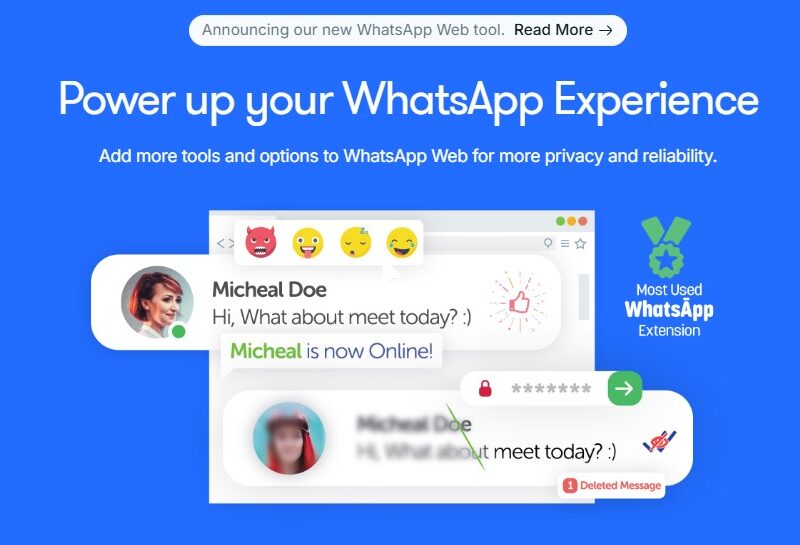
WA Web Plus is a browser extension designed to enhance and extend the capabilities of WhatsApp Web by adding advanced features for privacy, productivity, and business communication. It operates within supported web browsers such as Google Chrome and other Chromium-based browsers, giving users additional controls and tools that are not available in the standard WhatsApp Web interface. The extension is developed by Elbruz Technologies and is widely used to improve messaging workflows and user experience online.
Features
1. Privacy and Interface Enhancements
WA Web Plus includes several enhancements aimed at protecting user privacy and improving usability:
-
Blur private information on screen, including contact names, photos, and messages.
-
Hide online status indicators like “typing” or “recording.”
-
Disable read receipts (blue ticks).
-
Protect the WhatsApp Web tab with a password.
2. Business Communication Tools
For more advanced messaging and business workflows, the extension provides:
-
Broadcasting tools for sending messages to multiple contacts at once.
-
Smart replies and customizable automated response messages.
-
Scheduled messaging for automated delivery at specific times.
-
Contact exports and group management utilities.
3. Webhooks and Integrations
WA Web Plus supports webhook features, allowing users to connect WhatsApp interactions with external applications or services. With webhooks, incoming WhatsApp data can trigger custom operations such as retrieving weather information, posting to calendars, or integrating with CRM systems.
4. Contacts and Chat Tools
The extension includes extra tools to:
-
Export contacts or chat lists from selected groups or broadcasts.
-
Track contact activity (online/offline status).
-
Initiate conversations with non-contacts directly.
Pros & Cons
Pros
-
Enhanced Privacy Controls: Users can protect sensitive information on screen beyond default WhatsApp options.
-
Productivity Features: Tools like scheduled messages and smart replies streamline messaging workflows.
-
Webhook Support: Enables deeper automation and connection with external systems.
-
Improved Messaging Tools: Broadcast and export utilities improve communication for business users.
-
High User Ratings: The extension is highly rated on extension stores, with millions of installs.
Cons
-
Not Officially Affiliated With WhatsApp: The extension is not endorsed by WhatsApp, and use may carry risks of restrictions.
-
Requires Browser Use: It only functions within supported browsers and does not extend to mobile apps.
-
Potential Account Risk: Extensive automated messaging may violate WhatsApp terms, leading to account limitations.
-
User-Dependent Features: Some features rely on manual setup or technical configurations such as webhooks.
Use Cases:
1. Business Messaging and Marketing
WA Web Plus can be used to send targeted broadcast messages to customers, schedule follow-ups, and manage messaging campaigns more efficiently than the native WhatsApp Web interface.
2. Privacy-Focused Users
Individuals concerned about privacy in shared or public environments benefit from blurring messages and hiding status indicators while using WhatsApp Web.
3. Customer Service
Support professionals can automate responses to common queries, export contacts for outreach, and integrate messaging workflows with external support systems.
4. Workflow Automation
With webhooks and custom scripting, businesses can connect WhatsApp conversations to external systems like CRM, scheduling tools, and notification platforms.
5. Group and Community Management
Administrators can use group features to manage messaging events or automate group actions for better engagement.
Compared to Other Tools
Compared to the standard WhatsApp Web, WA Web Plus significantly expands functionality with privacy, broadcasting, and automation tools that are not natively available. It differs from dedicated third-party WhatsApp CRM products by focusing primarily on browser enhancements and user interface improvements. Other CRM extensions may offer deeper customer relationship management, contact tagging, and analytics, whereas WA Web Plus prioritizes enhanced WhatsApp experience and automation within the browser environment.
WA Web Plus is a powerful browser extension that makes WhatsApp Web a more capable platform for both personal and business communication. With robust privacy tools, advanced messaging features, and automation capabilities through webhooks, it delivers significant enhancements over the default WhatsApp Web experience. However, because it is not officially affiliated with WhatsApp and depends on browser functionality, users should understand the potential risks and limitations before deploying it extensively.
FAQs
1. What is WA Web Plus?
WA Web Plus is a browser extension that adds extra privacy, productivity, and automation features to the WhatsApp Web platform.
2. How do I install WA Web Plus?
Install the extension through your Chromium-based browser’s extension store (such as the Chrome Web Store) and activate it via the browser toolbar.
3. Can I send bulk messages with WA Web Plus?
Yes, the extension supports broadcast features that allow sending messages to selected contacts or uploaded lists.
4. Does WA Web Plus work on mobile?
No, the functionality is tied to web browsers and does not extend to native mobile applications.
5. Is WA Web Plus affiliated with WhatsApp?
No, WA Web Plus is developed independently and is not officially affiliated with WhatsApp or Meta.