
Vmake
What is Vmake Video Enhancer?
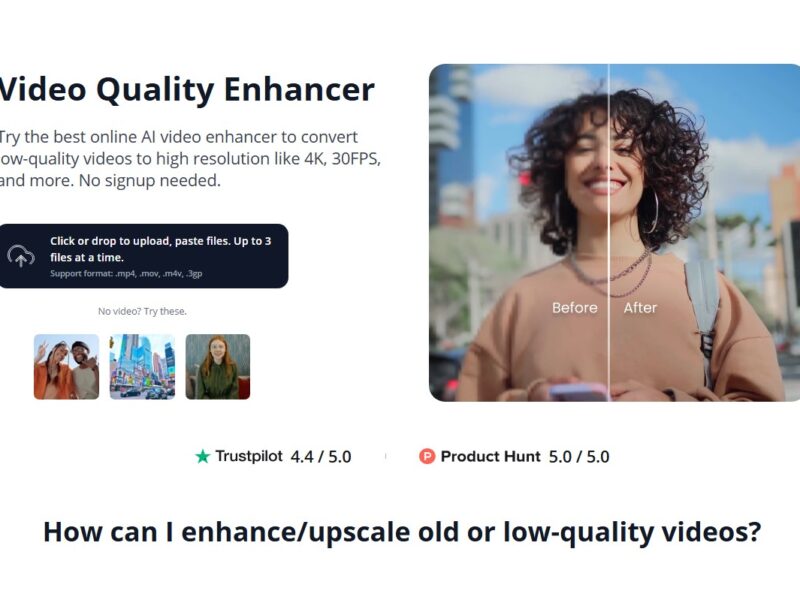
Vmake Video Enhancer is an advanced video enhancement tool designed to improve the quality of videos through artificial intelligence (AI). Whether you’re working with low-resolution footage, outdated clips, or want to enhance video details, Vmake utilizes AI algorithms to upscale video resolution, sharpen image quality, reduce noise, and add clarity to pixelated visuals. This tool is ideal for content creators, marketers, filmmakers, and anyone who works with video content and needs a quick, efficient way to improve video quality without complex editing processes.
With its intuitive interface, Vmake Video Enhancer makes professional-grade video enhancement accessible to both experienced video editors and novices alike. The AI technology behind Vmake automates many of the manual tasks involved in video enhancement, making it a powerful tool for improving video quality in just a few clicks.
Features
-
AI-Powered Video Upscaling: Vmake Video Enhancer uses AI to upscale low-resolution videos to higher resolutions (e.g., from 480p to 1080p or 4K), enhancing the overall clarity and sharpness of your footage without introducing artifacts.
-
Noise Reduction: The tool features noise reduction capabilities that eliminate unwanted grain or visual noise in videos, resulting in cleaner and more professional-looking footage.
-
Video Sharpening: Vmake can sharpen blurry videos, helping to bring out more detail in the footage and create a crisper image, especially useful for videos shot in low-light conditions.
-
Color Correction & Enhancement: The software offers tools to adjust the brightness, contrast, and color saturation of videos, helping to improve their vibrancy and make them visually appealing.
-
Batch Processing: Vmake allows users to process multiple videos simultaneously, which is highly beneficial for content creators, marketers, and businesses that need to enhance a large volume of video content quickly.
-
User-Friendly Interface: The platform is designed with simplicity in mind. Even those with little to no video editing experience can easily use Vmake to enhance their videos with just a few clicks.
-
Multi-Format Support: Vmake supports a wide range of video formats, including MP4, AVI, MOV, and more, ensuring compatibility with different devices and platforms.
-
Fast Processing: Vmake Video Enhancer processes videos efficiently, delivering high-quality results without lengthy waiting times, even for large files.
-
Cloud-Based Solution: Vmake Video Enhancer operates in the cloud, which means users can access it from anywhere and don’t need to worry about hardware limitations or software installations.
Pros & Cons
Pros:
-
AI-Powered Precision: The use of AI technology ensures that the enhancements are applied with a high degree of accuracy, providing better results than traditional video editing techniques.
-
Ease of Use: The interface is designed to be simple and intuitive, even for beginners, making it accessible to users without video editing expertise.
-
Batch Processing: The ability to enhance multiple videos at once saves significant time for users with large volumes of footage.
-
High-Quality Output: Vmake’s AI algorithms enhance videos to professional standards, including resolution upscaling and noise reduction, ensuring the final output looks polished.
-
Cloud-Based Access: Being a cloud-based tool, Vmake allows users to enhance videos from any device with internet access, making it more flexible and convenient.
-
Fast Processing Speed: The tool is optimized for speed, delivering high-quality enhancements without long processing times.
Cons:
-
Limited Advanced Editing Tools: While Vmake excels in video enhancement, it does not offer a wide range of advanced editing tools, such as effects, transitions, or video compositing, which might be necessary for more complex video projects.
-
Internet Dependency: Since it is a cloud-based platform, users need a stable internet connection to access and use the tool effectively.
-
Cost for Premium Features: While Vmake offers basic video enhancement features for free, accessing advanced functionalities (such as batch processing or 4K upscaling) may require a paid subscription.
-
Output Format Limitations: Although Vmake supports several popular formats, it may not support every niche video format that some professional editors might require.
Use Cases for Vmake Video Enhancer:
-
Content Creators: YouTubers, vloggers, and social media influencers can use Vmake Video Enhancer to improve the quality of their videos, especially when dealing with low-resolution footage or older content.
-
Marketing and Advertising: Marketers and advertisers can use the tool to enhance video ads, promotional materials, and product videos, ensuring they look professional and polished before being published on websites or social media.
-
E-Learning and Educational Videos: Educational content creators can enhance their training videos, making them clearer and more engaging for viewers, which is particularly useful for online courses and tutorials.
-
Archiving and Restoring Old Footage: Vmake Video Enhancer can breathe new life into old or archived video content, improving the quality of legacy footage for digital archiving, documentaries, or historical preservation.
-
Real Estate and Property Marketing: Real estate agents and property marketers can use Vmake to improve the quality of property tour videos, showcasing homes and apartments in the best possible light.
-
Film and TV Post-Production: Independent filmmakers and production houses can use Vmake to enhance raw footage before final editing, especially when dealing with older, lower-quality material.
How Vmake Video Enhancer Compares to Other Tools?
Vmake Video Enhancer vs. Adobe Premiere Pro
Adobe Premiere Pro is a professional video editing software that offers advanced features such as multi-track editing, color correction, and motion graphics. However, it requires a steep learning curve and is best suited for experienced video editors. In contrast, Vmake Video Enhancer is focused on automation and ease of use, leveraging AI to enhance video quality without the need for manual adjustments or advanced editing techniques. While Premiere Pro offers greater control over the editing process, Vmake is ideal for users who need a quick, automated solution for improving video quality.
Vmake Video Enhancer vs. Topaz Video Enhance AI
Topaz Video Enhance AI is another AI-powered video enhancement tool that specializes in upscaling and restoring video quality. While both platforms utilize AI to enhance videos, Topaz Video Enhance AI is known for its higher level of customization and detailed control over the enhancement process, making it more suitable for professional editors. Vmake, on the other hand, is designed to be simpler and faster, catering to users who need an easy-to-use solution with minimal effort involved.
Vmake Video Enhancer vs. DaVinci Resolve
DaVinci Resolve is a professional video editing software that offers extensive color grading, editing, and post-production tools. While DaVinci Resolve provides a full suite of video editing features, Vmake Video Enhancer is more specialized, focusing on enhancing the visual quality of videos through AI. DaVinci Resolve is better suited for users who require detailed control over every aspect of the video production process, while Vmake is ideal for those who want a quick, automated enhancement tool.
Vmake Video Enhancer vs. Filmora
Filmora is a user-friendly video editing software with a focus on simplicity and ease of use. While Filmora offers basic video editing tools, it lacks the AI-powered enhancements that Vmake provides. Filmora users can enhance videos manually, but Vmake’s automated AI enhancements—such as upscaling, noise reduction, and sharpening—offer a more hands-off, time-efficient solution for improving video quality.
Vmake Video Enhancer is an exceptional tool for anyone looking to quickly and easily enhance their video content using AI technology. Whether you’re a content creator, marketer, or business professional, Vmake simplifies the process of improving video quality, offering features like upscaling, noise reduction, sharpening, and color correction. Its user-friendly interface, cloud-based access, and batch processing capabilities make it a valuable tool for users with varying levels of experience.
While it may not offer the deep customization options of professional video editing software, Vmake excels in automating the video enhancement process, saving users time and effort. Its AI-powered technology produces high-quality results, making it an ideal solution for both personal and professional use.
FAQs
-
What types of videos can I enhance with Vmake?
Vmake can be used to enhance any type of video, including YouTube videos, product demos, training videos, real estate listings, and more. -
Can I use Vmake Video Enhancer for free?
Yes, Vmake offers basic video enhancement features for free. However, advanced features like batch processing and 4K upscaling require a premium subscription. -
How does the AI technology work in Vmake?
Vmake uses machine learning algorithms to analyze video content, automatically enhancing resolution, reducing noise, and improving sharpness based on the input video. -
Does Vmake support all video formats?
Vmake supports a wide range of video formats, including MP4, AVI, and MOV. However, some niche formats may not be fully supported. -
How long does it take to enhance a video with Vmake?
The processing time depends on the video length and the level of enhancement required. However, Vmake is optimized for fast processing, with results typically available in a matter of minutes.