
Userback
What is Userback?
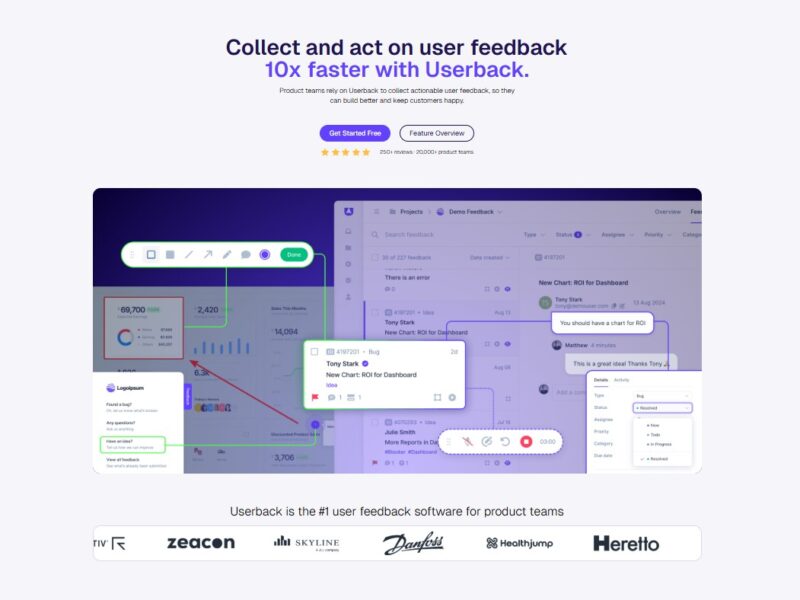
Userback is a feedback and bug tracking tool that allows teams to collect visual feedback directly from their users. It is built to help developers and product teams capture real-time feedback, including annotated screenshots and videos, to better understand issues and improve their software or web applications. Userback integrates with popular project management tools like Jira, Trello, and Slack, making it a convenient addition to any team’s workflow.
With Userback, users can easily leave feedback on websites and applications by using intuitive tools such as drawing annotations on screenshots or recording video feedback, which are then automatically logged for review. This allows teams to gain more detailed insights into issues, leading to faster resolutions and better product development.
Features
Userback offers a variety of features that set it apart as an efficient tool for feedback collection and bug tracking:
-
Visual Feedback: Users can capture and submit annotated screenshots and video recordings, giving clear, actionable insights into issues and requests.
-
Integrations with Popular Tools: Userback integrates seamlessly with tools such as Jira, Trello, Slack, and Asana, allowing teams to manage feedback and track bugs without leaving their project management environment.
-
Customizable Feedback Widgets: Userback provides fully customizable feedback widgets that can be embedded into your web applications or websites. These widgets allow users to submit feedback with ease.
-
Bug Tracking: The platform includes an efficient bug tracking system that lets teams prioritize and track issues from submission to resolution.
-
User Tags and Filtering: Userback lets teams organize feedback using tags and filters, making it easy to categorize and find specific user issues or requests.
-
Real-Time Notifications: Get instant notifications when feedback is submitted or when a new bug is tracked, helping teams respond quickly to user concerns.
-
Collaboration Features: Teams can collaborate on feedback, discuss issues in context, and assign tasks to the appropriate team members for resolution.
-
Custom Branding: With Userback, you can customize the look and feel of the feedback interface to match your company’s branding, ensuring consistency and a professional user experience.
Pros & Cons
Pros:
-
Visual Feedback: The ability to capture annotated screenshots and video feedback makes it easy to understand the exact issue, reducing confusion and back-and-forth communication.
-
Easy to Use: Userback’s interface is user-friendly and intuitive, allowing teams to set up the feedback system quickly without a steep learning curve.
-
Seamless Integrations: The wide range of integrations with project management tools ensures that feedback can be easily incorporated into existing workflows.
-
Real-Time Feedback: Instant notifications help teams to act quickly on feedback, improving overall response time.
-
Customizable Widgets: The customizable feedback widgets enhance user experience and make it easy for users to submit feedback directly on your application or website.
Cons:
-
Pricing: While Userback is a robust tool, its pricing can be on the higher side for smaller teams or startups, particularly as the feature set grows with higher-tier plans.
-
Limited Features on Lower Plans: Some advanced features, such as integrations and custom branding, are only available on higher-tier plans, which may be restrictive for some users.
-
Not as Comprehensive for Large-Scale Teams: For larger teams or companies with complex needs, some advanced features might be lacking compared to other enterprise-level solutions.
-
Limited Analytics: While Userback offers great feedback collection tools, its analytics features are not as advanced as some other competitors, which might limit data-driven decision-making.
Use Cases of Userback:
Userback is versatile and can be used in various scenarios, including:
-
Website and Web App Development: Collect visual feedback from users on your website or web application to quickly identify bugs and areas for improvement.
-
Mobile App Feedback: Mobile app developers can use Userback to receive feedback on app performance, usability, and bugs through visual annotations and screen recordings.
-
Software QA Testing: Userback simplifies bug reporting by allowing QA testers to submit detailed feedback, which developers can use to troubleshoot and fix issues quickly.
-
User Research and Usability Testing: Teams can use Userback to collect feedback during usability testing sessions, providing direct insights into user behavior and pain points.
-
Customer Support: Customer support teams can use Userback to better understand user complaints and resolve issues more efficiently by having clear, visual explanations.
Compared to Other Tools
When compared to other feedback and bug tracking tools like BugHerd, Hotjar, and Feedbackify, Userback has several unique advantages:
-
BugHerd: Both BugHerd and Userback offer visual feedback tools, but Userback stands out with its video feedback feature, making it more versatile for remote teams and providing better context for developers.
-
Hotjar: While Hotjar provides heatmaps and session recording, Userback focuses primarily on detailed, actionable user feedback through visual annotations and bug tracking. Hotjar is more geared toward analytics, whereas Userback is a more direct feedback tool.
-
Feedbackify: Feedbackify is another feedback collection platform, but Userback offers more robust features for developers, such as better integrations with tools like Jira and Trello and the ability to record video feedback.
Userback’s visual feedback, customizable widgets, and seamless integrations make it a standout solution for teams looking to improve communication and speed up development cycles.
Userback is a powerful, easy-to-use feedback and bug tracking tool designed for product teams, developers, and customer support teams. With its focus on visual feedback through annotated screenshots and videos, it allows teams to gain valuable insights into user issues, prioritize bugs effectively, and resolve problems faster. While the platform may be a bit costly for smaller teams and lacks some advanced analytics, its integrations and user-friendly interface make it an excellent choice for most product development teams looking to improve their feedback collection process.
FAQs
-
Is Userback easy to set up?
Yes, Userback is simple to set up. The feedback widget can be embedded on your site or app with minimal effort, and the dashboard is intuitive for both developers and product teams. -
Does Userback offer a free trial?
Yes, Userback offers a 14-day free trial, allowing you to explore its features and decide if it’s the right tool for your needs. -
Can I use Userback for mobile app feedback?
Absolutely! Userback can be integrated with mobile apps to collect visual feedback and bug reports from users, making it ideal for mobile app developers. -
Does Userback integrate with Jira and other project management tools?
Yes, Userback offers integrations with Jira, Trello, Slack, and Asana, allowing you to seamlessly manage and track feedback within your existing workflow. -
Can I customize the feedback widget on my site?
Yes, Userback allows you to fully customize the feedback widget to match your company’s branding and the look and feel of your website or app.