
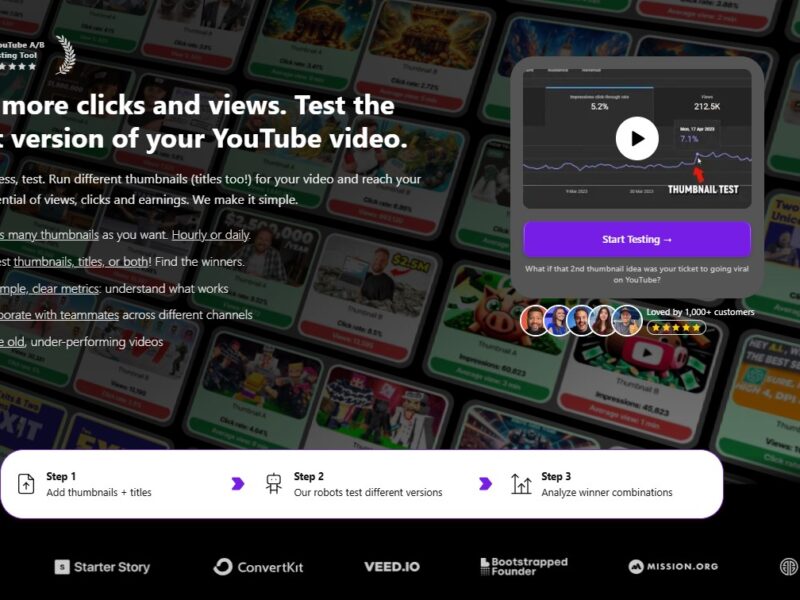
Thumbnail Test
What is ThumbnailTest?
ThumbnailTest is an A/B testing platform that helps businesses and content creators test and optimize their thumbnail images and visuals. Whether you’re uploading videos on YouTube, promoting products on social media, or creating blog posts, the platform allows you to test multiple thumbnail designs and assess which one performs best in terms of user engagement. By providing valuable insights into how viewers interact with different thumbnails, ThumbnailTest ensures that your visuals are not only eye-catching but also effective in driving clicks and conversions.
Features
-
A/B Testing for Thumbnails
The core feature of ThumbnailTest is its A/B testing functionality, which allows users to test different versions of a thumbnail. You can upload multiple thumbnail designs and compare them to see which one attracts more clicks, likes, or shares. -
Real-Time Analytics
ThumbnailTest provides real-time performance analytics, showing how each thumbnail is performing in terms of click-through rates (CTR), engagement, and other relevant metrics. This data allows users to make informed decisions on which thumbnail to use for maximum impact. -
Customizable Test Parameters
Users can set specific goals for their tests, such as click-through rates or engagement levels, and adjust parameters like audience segments, test duration, and more. This customization ensures that tests are tailored to the specific needs of the campaign. -
Cross-Platform Compatibility
ThumbnailTest works across multiple platforms, including YouTube, Facebook, Instagram, and other social media platforms. This cross-platform compatibility allows users to optimize visuals for different channels and reach a broader audience. -
User-Friendly Interface
The platform is designed with ease of use in mind, offering an intuitive interface that allows users to quickly upload thumbnails, set up tests, and view results without requiring any technical expertise. -
Heatmap Visuals
In addition to traditional analytics, ThumbnailTest provides heatmaps to show where viewers are clicking on your thumbnails. This insight can help users understand which areas of the thumbnail are most engaging and which ones need improvement. -
Split Testing for Multiple Variations
Users can test more than just two versions of a thumbnail at a time. ThumbnailTest allows for split testing, where you can compare up to four different thumbnail versions in a single test, saving time and increasing the accuracy of your results.
Pros & Cons
Pros:
-
Optimized Visual Performance: By testing multiple thumbnail variations, ThumbnailTest ensures that your visuals are optimized for maximum engagement and conversion.
-
User-Friendly Interface: The platform is intuitive and easy to use, even for non-technical users, making it accessible for businesses and content creators alike.
-
Real-Time Analytics: ThumbnailTest provides actionable insights through real-time analytics, allowing users to make adjustments quickly based on performance data.
-
Cross-Platform Integration: With support for multiple platforms like YouTube, Instagram, and Facebook, the tool provides flexibility for content creators and businesses to optimize visuals across various channels.
-
Heatmaps: The inclusion of heatmap visuals provides additional insights into which parts of your thumbnails attract the most attention, helping to fine-tune your design.
Cons:
-
Limited Free Plan: While ThumbnailTest offers a free version, it has limitations in terms of the number of tests you can run and the features available. To access more advanced features, users need to upgrade to a paid plan.
-
Platform-Specific: ThumbnailTest primarily focuses on thumbnails and may not be as comprehensive as other visual testing tools that cover a broader range of content elements (e.g., full-page or banner ads).
-
Learning Curve for Advanced Features: While the platform is generally easy to use, some of its more advanced features, such as split testing and setting up custom parameters, may require a bit of time to master.
Use Cases for ThumbnailTest:
-
YouTube Content Creators
YouTube is a visual-first platform, and thumbnails play a crucial role in driving clicks and views. ThumbnailTest allows YouTubers to test different thumbnail designs, colors, and layouts to see which one yields the highest CTR, increasing the chances of video success. -
E-commerce Stores
For online retailers, product images are essential for driving sales. ThumbnailTest can be used to A/B test product images or promotional banners to ensure that the visuals resonate with customers and encourage more purchases. -
Social Media Marketers
Social media platforms like Instagram and Facebook rely heavily on engaging visuals. Marketers can use ThumbnailTest to test different social media post images and ads, optimizing them for maximum engagement and conversion rates. -
Advertisers and Campaign Managers
ThumbnailTest is perfect for advertisers running campaigns across multiple channels. By testing various ad visuals, advertisers can identify which thumbnails generate the best results, ensuring that their ad spend is optimized. -
Bloggers and Content Writers
Bloggers and content creators can use ThumbnailTest to test thumbnail images for their blog posts or articles. Optimizing these images helps to increase traffic and improve overall user engagement.
ThumbnailTest Compared to Other Tools
When comparing ThumbnailTest to other tools like TubeBuddy, Canva, and PicMonkey, here are some key differences:
-
TubeBuddy: TubeBuddy is another popular tool for YouTube creators that offers thumbnail testing features. However, ThumbnailTest focuses specifically on optimizing thumbnails and provides more granular insights into click-through rates and engagement, making it a more specialized tool for thumbnail optimization.
-
Canva: Canva is a powerful design tool used to create thumbnails, social media posts, and other graphics. While Canva excels in creating visuals, ThumbnailTest goes a step further by allowing users to A/B test those visuals to ensure they are effective. Canva does not offer A/B testing for thumbnails, so users would need to use both tools together for maximum benefit.
-
PicMonkey: PicMonkey offers similar design capabilities to Canva, allowing users to create visuals for thumbnails. However, it lacks the A/B testing features that ThumbnailTest provides. While PicMonkey is great for designing thumbnails, ThumbnailTest is focused on testing which designs actually work best for your target audience.
ThumbnailTest is a specialized A/B testing platform that allows businesses, content creators, and marketers to optimize their thumbnail images and visual content for better engagement and higher conversions. With its real-time analytics, cross-platform support, and heatmap functionality, ThumbnailTest provides valuable insights into how your visuals are performing. Whether you’re a YouTuber, e-commerce store owner, or social media marketer, ThumbnailTest offers an easy-to-use and powerful solution to ensure your thumbnails are optimized for success.
If you’re serious about improving your visual content and maximizing engagement, ThumbnailTest is a must-try tool.
FAQs
1. Is ThumbnailTest free to use?
ThumbnailTest offers a free version with basic features, but for more advanced capabilities like testing multiple thumbnails or accessing detailed analytics, users will need to subscribe to a paid plan.
2. Can I use ThumbnailTest for platforms other than YouTube?
Yes, ThumbnailTest supports multiple platforms, including Instagram, Facebook, and e-commerce sites. You can test visuals across various channels to optimize engagement and conversions.
3. How long does a test take?
The duration of a test depends on the traffic your visuals are receiving. However, tests can typically be set to run for several days to gather sufficient data before making a decision.
4. Does ThumbnailTest work with custom images?
Yes, you can upload custom thumbnails or images to ThumbnailTest for A/B testing. The tool works with a variety of visual formats, including images for social media, ads, and video thumbnails.
5. What metrics does ThumbnailTest track?
ThumbnailTest tracks several performance metrics, including click-through rates (CTR), engagement levels, and heatmaps to provide insights into how viewers are interacting with your thumbnails.