
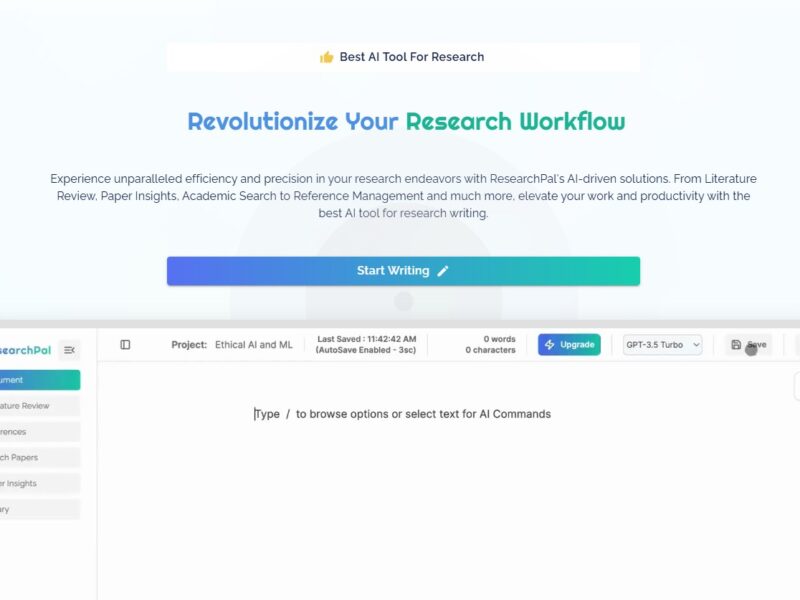
ResearchPal
What is ResearchPal?
ResearchPal is a web-based research management platform that offers a range of tools to aid researchers in managing and organizing their work. From data collection to literature review and citation management, ResearchPal integrates several functionalities into one easy-to-use interface. It is designed to help users stay organized throughout the entire research lifecycle, enhancing productivity and ensuring a structured approach to research projects.
Whether you’re a graduate student managing multiple papers or a professional researcher collaborating on a large-scale project, ResearchPal provides an array of tools that simplify the research process. With features for organizing references, annotating PDFs, and collaborating with teams, ResearchPal offers an efficient solution for modern research needs.
Features
1. Project Management
ResearchPal allows you to create and manage research projects, providing an overview of all your research tasks, deadlines, and milestones. This helps researchers track progress and stay on schedule.
2. Citation Management
With built-in citation management tools, ResearchPal helps you collect, organize, and generate citations for your research. The tool supports various citation styles, including APA, MLA, Chicago, and more, ensuring that all your references are correctly formatted.
3. Data Collection & Organization
ResearchPal offers flexible tools for data collection, whether through surveys, interviews, or experimental data. You can categorize and tag your findings, making it easier to search and organize your research.
4. Collaborative Features
The platform supports collaborative research, allowing teams to work together in real-time. You can share notes, documents, and even specific sections of your project with colleagues, facilitating easier communication and collaboration.
5. PDF Annotation & Highlighting
ResearchPal allows you to upload and annotate PDFs directly within the platform. You can highlight key sections, add notes, and even link citations, all within your project, improving your overall research organization.
6. Note-Taking and Organizing
With built-in note-taking functionality, ResearchPal helps you keep track of ideas, summaries, and important insights. Notes can be linked to specific research items, making it easier to retrieve and use them when needed.
7. Integrated Literature Database
ResearchPal provides an integrated database of academic papers, journals, and articles, which can be accessed and cited directly within your project. This reduces the time spent searching for resources and ensures your research is well-supported.
8. Export & Sharing Options
Once your research is complete, ResearchPal offers various export options, allowing you to share your work in a range of formats (e.g., PDF, Word, or Excel). This makes it easy to present your findings in a professional manner.
Pros and Cons
Pros
-
User-Friendly Interface
ResearchPal is designed with a simple, intuitive interface that makes it easy to navigate for both beginners and experienced researchers. -
All-in-One Research Management
With tools for project management, citation tracking, note-taking, and collaboration, ResearchPal eliminates the need for multiple tools, streamlining the research process. -
Time-Saving Automation
ResearchPal automates tasks like citation formatting and document organization, allowing researchers to focus on more critical aspects of their projects. -
Collaboration-Friendly
With real-time collaboration, ResearchPal is ideal for research teams. It supports team-based workflows, making it easier to share insights, data, and progress. -
Cross-Platform Accessibility
As a cloud-based platform, ResearchPal is accessible from any device with an internet connection, making it convenient for researchers working from multiple locations.
Cons
-
Limited Customization
While ResearchPal offers great functionality, some users may find that it lacks deep customization options for managing more complex or highly specialized research needs. -
Internet Dependency
Since ResearchPal is a cloud-based tool, you need an internet connection to access your data. This could be a limitation for users who need to work offline or in areas with limited connectivity. -
Pricing
While ResearchPal offers a lot of features, its subscription model might not be affordable for all researchers, particularly for those who are just starting or working with limited budgets. -
Learning Curve for New Users
Despite its user-friendly interface, new users may take some time to explore and familiarize themselves with all of the available features and tools.
Use Cases of ResearchPal:
1. Academic Research Projects
ResearchPal is ideal for students and academic researchers working on theses, dissertations, or journal articles. Its citation management, note-taking, and literature review features make organizing and structuring large research projects much easier.
2. Team-Based Research
For teams working on collaborative research projects, ResearchPal provides a centralized platform for sharing documents, data, and updates. Real-time collaboration ensures that all team members are on the same page.
3. Literature Reviews
Researchers conducting literature reviews can use ResearchPal to efficiently manage and annotate academic papers, organize key insights, and track citations across multiple sources.
4. Survey Data Collection
ResearchPal can be used to organize and analyze data collected from surveys or interviews. Researchers can tag and categorize responses, making it easier to draw conclusions from large datasets.
5. Content Creation for Research Publications
Writers and researchers preparing content for publications can use ResearchPal to structure their manuscripts, track sources, and streamline the writing process.
ResearchPal vs Other Tools
When compared to other research tools like Zotero, Mendeley, or EndNote, ResearchPal offers a more comprehensive suite of features.
-
Zotero: While Zotero is great for citation management and resource organization, it doesn’t offer the same level of integrated project management, note-taking, or collaboration features that ResearchPal does.
-
Mendeley: Mendeley is another strong reference manager but lacks the in-depth project management capabilities of ResearchPal. While it provides tools for collaboration and citation, it doesn’t focus as much on streamlining the full research process.
-
EndNote: EndNote is an industry-standard for reference management and bibliography creation, but it lacks the intuitive, collaborative workspace and project management tools that ResearchPal offers, making it more suited for reference-heavy tasks than the full research workflow.
ResearchPal offers a comprehensive solution for researchers looking to streamline their workflow and enhance productivity. With its all-in-one approach to project management, citation tracking, data organization, and collaboration, it’s a strong contender for anyone involved in academic or professional research. The ability to annotate PDFs, track citations, and collaborate in real-time makes ResearchPal a particularly appealing tool for teams.
While it does come with some limitations in terms of customization and offline accessibility, its overall value for researchers—especially those managing large projects or collaborating with teams—cannot be overstated. For those who need a central hub to manage all aspects of their research process, ResearchPal is an excellent tool.
FAQs
1. What is ResearchPal used for?
ResearchPal is used for organizing and managing research projects. It helps with citation management, data collection, note-taking, and collaboration, all in one platform.
2. Can ResearchPal be used for collaborative research?
Yes, ResearchPal supports real-time collaboration, making it ideal for team-based research projects where multiple people need to access and edit the same documents.
3. Is ResearchPal suitable for students?
Absolutely! ResearchPal is designed to be user-friendly and is ideal for students working on theses, dissertations, or academic papers. Its citation management features are particularly useful for academic research.
4. Can I access my research on multiple devices?
Yes, since ResearchPal is cloud-based, you can access your research from any device with an internet connection.
5. Is there a free version of ResearchPal?
ResearchPal offers a subscription-based model, but there may be a free trial available for new users to test out the platform before committing to a subscription.