
Repper
What is Repper?
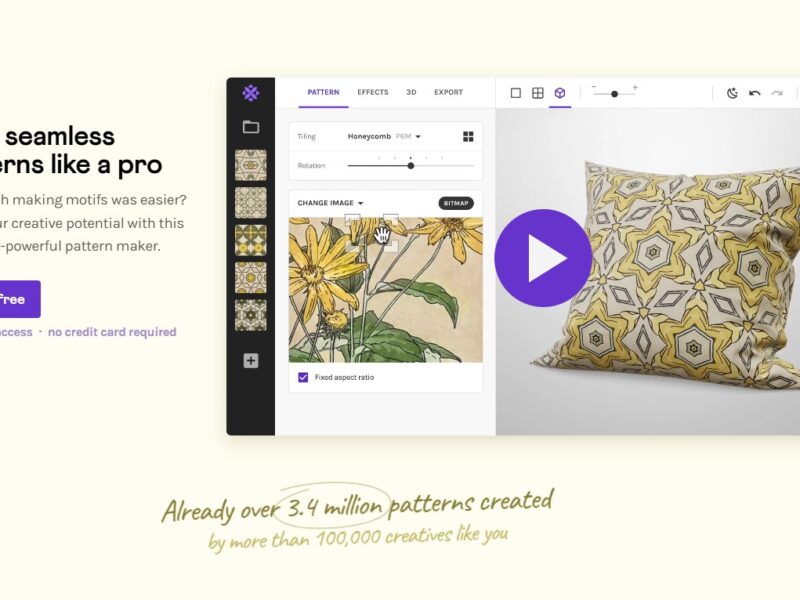
Repper is an AI-powered pattern creation tool designed to help graphic designers, artists, and marketers effortlessly generate unique, seamless patterns from any image or design concept. The platform utilizes advanced algorithms to analyze an image and turn it into a high-quality, repeating pattern that can be used for a wide variety of creative projects.
With Repper, users can create intricate and visually dynamic patterns with ease, making it a valuable tool for anyone in need of custom designs for textiles, websites, wallpapers, branding, and much more. The intuitive interface and AI-driven technology allow even beginners to create professional-looking designs without advanced knowledge of design software.
Features
Repper offers a range of features that set it apart from traditional design tools:
-
AI-Powered Pattern Generation: Repper uses AI to analyze any image you upload and transforms it into a seamless, repeatable pattern. The tool works by detecting shapes, colors, and motifs within the image, which it then arranges into a visually appealing, infinite pattern.
-
Customizable Pattern Styles: Users can choose from various pattern styles, including classic, geometric, organic, and abstract. You can tweak the arrangement, scale, and colors of the pattern to suit your specific needs.
-
Instant Preview and Editing: As you adjust the parameters, Repper instantly shows you a live preview of your pattern. This real-time feedback allows you to experiment with different settings and get the perfect look in less time.
-
High-Resolution Output: Repper generates high-resolution patterns that can be downloaded and used for both digital and print projects. Whether you need patterns for a website background or a textile design, the output quality is suitable for any application.
-
Seamless Integration with Design Software: Once you’ve created your pattern, you can download it in various file formats (JPEG, PNG, SVG) and import it into popular design software like Adobe Illustrator or Photoshop for further refinement.
-
Pattern Templates: Repper offers a range of pre-made templates that you can start with, which are great for inspiration or to use as a foundation for your own custom patterns.
-
Export Options: You can export patterns in different file formats and resolutions, making it easy to incorporate them into web designs, marketing campaigns, or print products.
-
Unlimited Creativity: With Repper, you are not limited to basic, repetitive designs. The platform’s AI allows you to create intricate, complex patterns with multiple layers, colors, and textures, giving you unlimited creative freedom.
Pros & Cons
Pros:
-
AI-Driven Convenience: Repper’s AI capabilities make it easy to generate patterns quickly without the need for intricate manual design work. This saves time and enhances productivity.
-
User-Friendly Interface: The tool is intuitive and easy to use, even for individuals with no prior design experience. Its live preview feature ensures that users can see their designs in real-time and make instant adjustments.
-
Customizable Designs: You have full control over the pattern’s scale, colors, and style, allowing for a highly personalized design experience.
-
High-Quality Outputs: Repper generates high-resolution patterns that are perfect for professional use, whether online or in print.
-
Perfect for Multiple Industries: From fashion and interior design to digital marketing and branding, Repper is suitable for a wide range of industries and design needs.
Cons:
-
Limited Free Features: While Repper offers a free trial, access to all the features and higher-quality output options requires a paid subscription.
-
Learning Curve for Advanced Features: Although the tool is generally user-friendly, mastering some of the more advanced features (such as complex pattern manipulation) may take a little time.
-
Not Fully Integrated with All Design Software: While Repper supports exports to common formats like PNG, JPEG, and SVG, direct integration with every design platform might not be seamless for all users.
-
Dependent on Image Quality: The quality of the generated pattern heavily depends on the image you upload. Low-quality images may result in subpar patterns.
Use Cases for Repper:
-
Textile and Fashion Design: Designers in the fashion industry can use Repper to create custom fabric patterns, from simple geometric designs to intricate, detailed motifs. The tool’s ability to produce seamless patterns is perfect for textile production.
-
Interior Design: Interior designers can use Repper to generate wallpaper designs, fabric patterns for upholstery, or custom flooring patterns, making it a versatile tool for home decor projects.
-
Web and Graphic Design: For web designers, creating unique background patterns or website elements is easier than ever. Repper allows users to create custom patterns that can be used in branding, UI/UX design, or digital marketing materials.
-
Marketing and Branding: Marketers can use Repper to design unique branding elements like logos, banners, or product packaging that stand out by utilizing custom patterns that align with the brand’s identity.
-
Product Packaging and Labeling: Repper can help brands create custom packaging designs that include distinctive, branded patterns. This can be particularly useful for product labels, gift wraps, or other marketing materials.
Repper Compared to Other Tools
When compared to other pattern creation tools, Repper stands out for its AI-driven approach and ease of use. Let’s see how it compares with some popular alternatives:
-
vs. Adobe Illustrator: While Adobe Illustrator offers more comprehensive design tools for creating patterns from scratch, Repper focuses on simplicity and speed. Illustrator requires manual input and design expertise, whereas Repper leverages AI to automate the pattern creation process, making it easier for beginners.
-
vs. Patterninja: Patterninja is another popular tool for creating patterns, but it lacks the advanced AI capabilities that Repper offers. Repper’s AI can analyze an image and transform it into a seamless pattern in just a few clicks, whereas Patterninja is more manual in nature, requiring users to arrange elements themselves.
-
vs. Canva: While Canva offers an easy-to-use design platform with customizable templates, it does not focus specifically on AI-powered pattern creation. Repper provides a more specialized and advanced solution for seamless, high-quality pattern design.
-
vs. Seamless Studio: Seamless Studio is similar to Repper in terms of creating seamless patterns, but Repper offers a more intuitive interface and quicker results with its AI-driven approach. Seamless Studio may offer more control over pattern adjustments, but Repper is ideal for users looking for fast and effortless pattern creation.
Repper is a game-changer for graphic designers, artists, and businesses in need of high-quality, customizable patterns. By utilizing AI to generate seamless designs from any image, it streamlines the process of creating intricate, professional patterns in record time. Its ease of use, combined with real-time editing features and high-resolution outputs, makes it an excellent tool for industries ranging from fashion and interior design to marketing and web development.
Although there are some limitations, such as the need for a paid subscription to access all features, Repper is a powerful tool that can greatly enhance a designer’s workflow, helping them create visually stunning patterns effortlessly.
FAQs
1. Can I use Repper for free?
Yes, Repper offers a free trial, but to access all the advanced features and download high-resolution patterns, you will need to subscribe to a paid plan.
2. How does Repper’s AI-powered pattern generation work?
Repper’s AI analyzes the image you upload and automatically detects key visual elements, such as shapes, colors, and motifs. It then arranges these elements into a seamless, repeating pattern that can be customized further.
3. What file formats does Repper support for exporting patterns?
Repper allows you to export patterns in several popular file formats, including JPEG, PNG, and SVG, making it compatible with most design software and platforms.
4. Is Repper suitable for beginners?
Yes, Repper is designed to be user-friendly, making it easy for beginners to create high-quality patterns without advanced design skills. The live preview feature and intuitive controls ensure that users can experiment with different settings quickly.
5. Can I use Repper to create patterns for printing?
Yes, Repper generates high-resolution patterns that are suitable for both digital and print applications, making it ideal for creating designs for textiles, marketing materials, and more.