
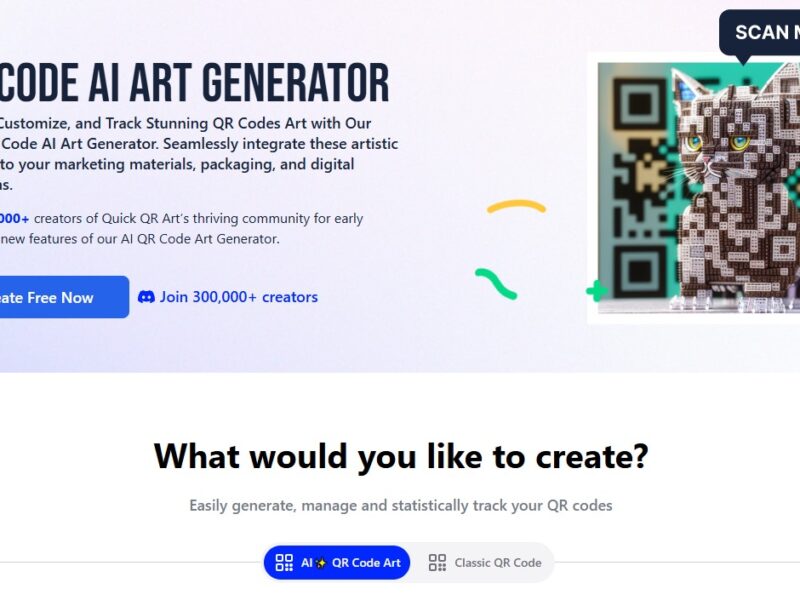
Quick QR Art
What is QuickQR?
QuickQR is an innovative platform designed to streamline the process of generating and managing QR codes for businesses, events, and personal use. With an emphasis on simplicity and efficiency, QuickQR allows users to create customized QR codes in seconds and provides robust analytics to track the performance of these codes in real time. Whether you’re looking to use QR codes for marketing campaigns, contactless payments, product information, or event management, QuickQR offers an easy-to-use solution to meet your needs.
QuickQR provides advanced features like dynamic QR codes, which can be edited after creation, and detailed tracking metrics to measure engagement and interactions. This makes it a versatile tool for businesses looking to leverage QR codes as part of their digital strategy while maintaining flexibility and control over their codes.
Features
QuickQR offers a comprehensive set of features designed to enhance the QR code creation process and provide valuable insights. Key features include:
-
Dynamic QR Codes: QuickQR allows users to create dynamic QR codes, meaning that the URL or data they point to can be edited after the code has been generated. This feature is particularly useful for marketing campaigns, where URLs may need to change over time without creating a new QR code.
-
Custom QR Code Design: Users can fully customize their QR codes, including adjusting colors, adding logos, and changing shapes, to make them align with their brand’s identity. This enhances the visual appeal of QR codes in marketing materials and campaigns.
-
Analytics and Tracking: QuickQR provides detailed tracking and analytics, allowing users to see how many scans their QR codes have received, where they were scanned, and at what time. This data is valuable for evaluating the effectiveness of campaigns and understanding user behavior.
-
Bulk QR Code Generation: For businesses that need to generate multiple QR codes at once, QuickQR offers bulk QR code creation. This is especially helpful for large-scale marketing efforts, event management, or product packaging.
-
Secure QR Codes: QuickQR includes built-in security features that ensure the QR codes are safe to use. This includes the ability to password-protect codes or set expiration dates, adding an extra layer of security for sensitive data or promotions.
-
Multi-Function QR Codes: QuickQR supports multiple types of QR codes, including URLs, text, email, phone numbers, Wi-Fi access, vCards, and more. This versatility makes it suitable for a wide range of use cases, from marketing to product information and networking.
-
API Integration: For businesses looking to integrate QR code generation into their own systems, QuickQR offers an API, enabling seamless integration with websites, apps, and other business tools.
Pros & Cons
Pros:
-
Ease of Use: QuickQR features a user-friendly interface that makes it easy for anyone to generate QR codes in just a few clicks. There’s no need for advanced technical skills to get started.
-
Dynamic Editing Capabilities: The ability to edit QR codes after they’ve been created is a game-changer for marketing campaigns. This flexibility ensures that businesses don’t need to create new codes every time a URL or promotion changes.
-
Comprehensive Analytics: The built-in analytics provide valuable insights into QR code performance, including scan location, device type, and time of scan. These data points help businesses refine their strategies and optimize engagement.
-
Customizability: QuickQR’s customization options make it easy to design branded QR codes that stand out, improving their visual appeal in advertisements, product packaging, and marketing materials.
-
Security Features: The option to set expiration dates, password-protect QR codes, and control access ensures that sensitive data and promotional campaigns are secure, reducing the risk of misuse.
Cons:
-
Limited Free Features: While QuickQR offers a free version, some of its more advanced features (such as dynamic QR codes and analytics) are only available through paid plans, which could be a limitation for users on a tight budget.
-
Not Ideal for Large Enterprises: While QuickQR works well for small to medium-sized businesses, large enterprises with more complex needs may find it lacking some of the advanced features and integrations offered by other enterprise-level QR code tools.
-
Limited Integrations: QuickQR offers an API for integration, but compared to other tools, the integration options might be more limited, especially for users who require deep integration with multiple third-party tools.
-
No Built-In Multi-Language Support: While QuickQR allows users to customize their QR codes, it does not offer automatic multi-language support, which could be a limitation for global campaigns targeting diverse audiences.
Use Cases for QuickQR:
QuickQR’s features make it an excellent tool for a variety of industries and use cases. Some common applications include:
-
Marketing Campaigns: Businesses can use QuickQR to create custom QR codes for promotional campaigns, redirecting customers to landing pages, special offers, or product details. The ability to track QR code performance helps businesses gauge the success of their campaigns.
-
Event Management: Event organizers can use QuickQR to create QR codes for event tickets, guest check-ins, and even to share event schedules or speaker information. Dynamic QR codes can be updated in real-time, ensuring that attendees always have access to the latest event details.
-
Retail and E-Commerce: Retailers can use QR codes on product packaging or in stores to provide additional product information, special promotions, or discounts. Customers can scan the code to access exclusive deals or product specifications directly from their phones.
-
Networking and Contact Sharing: QuickQR’s vCard functionality allows users to create QR codes that share contact information. This is especially useful for business cards, conferences, or networking events, where attendees can easily exchange contact information without manual input.
-
Hospitality and Tourism: Hotels, restaurants, and tourist attractions can use QuickQR to share menu items, booking information, or location details. Customers can scan codes placed at tables, in lobbies, or on brochures to get instant access to important details.
Compared to Other Tools
When compared to other QR code generation tools like QR Code Generator, Scanova, and Bitly, QuickQR offers several distinct advantages and some limitations.
-
QR Code Generator: QR Code Generator offers similar features to QuickQR but lacks the advanced tracking and dynamic QR code capabilities that QuickQR excels at. Additionally, QuickQR’s customization options for design are more flexible compared to QR Code Generator’s free offerings.
-
Scanova: Scanova is another powerful QR code creation tool that offers more advanced features, such as multi-language support, bulk QR code generation, and API integration. However, it is more expensive than QuickQR, which makes QuickQR a more budget-friendly option for small to medium-sized businesses.
-
Bitly: While Bitly is primarily known for shortening URLs, it also offers QR code generation services. However, QuickQR stands out for its design customization options, security features, and in-depth analytics. Bitly is often more focused on URL shortening rather than the broader functionality QuickQR offers for various QR code types.
In conclusion, QuickQR offers a well-rounded and cost-effective solution for businesses looking to create and manage QR codes. While it may not have the extensive range of features offered by more expensive tools, it provides an excellent balance of usability, customization, and tracking that suits small to medium-sized businesses well.
QuickQR is an intuitive and versatile tool for generating and managing QR codes, with an emphasis on simplicity, design flexibility, and real-time tracking. Whether you’re a small business, event organizer, or marketer, QuickQR offers an efficient and secure solution to incorporate QR codes into your digital strategy.
With features like dynamic QR codes, detailed analytics, and customizable designs, QuickQR provides great value for users looking for an easy-to-use QR code generator. While larger enterprises with more complex needs might require additional features, QuickQR remains a solid and affordable choice for most businesses.
FAQs
1. Can I create dynamic QR codes with QuickQR?
Yes, QuickQR allows users to create dynamic QR codes, which means you can change the URL or data linked to the code even after it’s been created.
2. What types of QR codes can I create with QuickQR?
QuickQR supports various types of QR codes, including URL links, text, email, phone numbers, Wi-Fi, vCards, and more.
3. Is QuickQR free to use?
QuickQR offers a free plan, but certain advanced features, such as dynamic QR codes and analytics, are only available through paid plans.
4. Can I track the performance of my QR codes?
Yes, QuickQR provides real-time analytics, allowing you to track how many scans your QR codes have received, where they were scanned, and other valuable metrics.
5. Can I customize the design of my QR codes?
Yes, QuickQR allows you to fully customize your QR codes by changing colors, adding logos, and adjusting the design to match your branding.