
Post Planner
What is Post Planner?
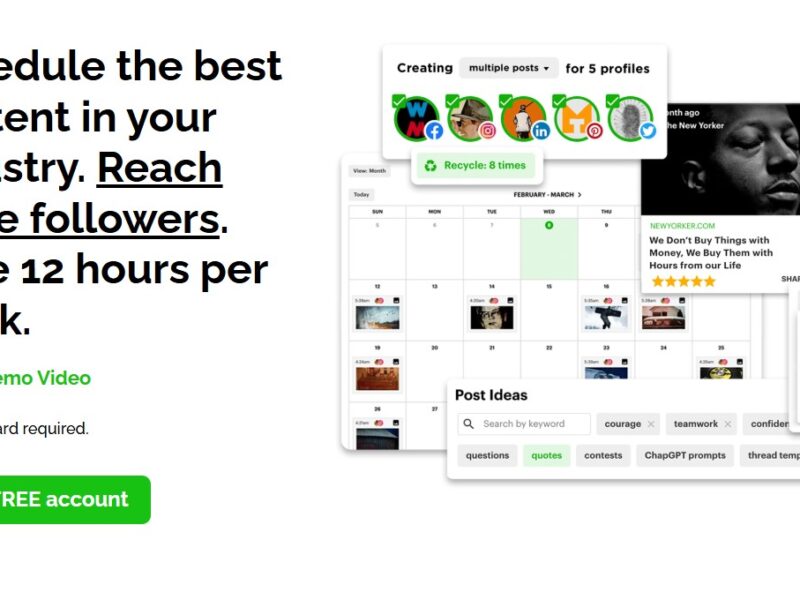
Post Planner is a social media management tool that allows businesses and individuals to create, schedule, and analyze social media content across multiple platforms. With its focus on content optimization and automation, Post Planner helps businesses save time, increase engagement, and grow their social media presence. The platform is designed to be user-friendly, making it easy for businesses to streamline their social media marketing efforts without needing extensive experience in content creation or scheduling.
With the growing need for businesses to maintain a strong online presence, Post Planner provides a powerful solution to ensure that social media marketing is both effective and efficient.
Features
Post Planner offers several key features designed to enhance the social media experience for businesses. Here are some of its standout features:
-
Content Scheduling and Automation: Post Planner allows businesses to schedule posts in advance, ensuring consistent content delivery across social media platforms. The platform supports multiple networks, including Facebook, Twitter, and Instagram.
-
Content Curation: Post Planner’s content curation feature helps businesses discover trending content that aligns with their brand. The tool suggests high-quality posts, articles, and media, making it easy to curate content that resonates with your audience.
-
Post Optimization: With built-in analytics, Post Planner helps businesses optimize their content by suggesting the best times to post for maximum engagement. The platform also provides recommendations on what types of content are performing best based on audience preferences.
-
Social Media Analytics: Post Planner tracks key performance metrics such as likes, shares, comments, and engagement rates. These insights help businesses refine their social media strategies and better understand their audience’s behavior.
-
Content Library: Post Planner provides a content library where businesses can store images, videos, and articles for easy access. This feature simplifies content management and ensures that you always have the right material available for posting.
-
Auto Post Reposting: Post Planner enables businesses to automatically repost top-performing content to keep their audience engaged. The tool can determine the best posts to reshare based on engagement and performance metrics.
-
Multiple Account Management: The platform allows businesses to manage multiple social media accounts from one dashboard, saving time and effort when managing social media campaigns across various platforms.
Pros & Cons
Pros:
-
Time-Saving Automation: The ability to schedule posts in advance and automate content curation helps businesses save time and maintain consistent engagement without having to manually post every day.
-
Content Discovery: Post Planner’s content curation feature helps businesses discover relevant, high-quality content to share with their audience, keeping their social media feeds fresh and engaging.
-
Post Optimization: The platform’s optimization recommendations ensure that businesses can post at the best times to reach their target audience, maximizing engagement.
-
User-Friendly Interface: Post Planner’s intuitive interface makes it easy for businesses of all sizes to manage their social media content, even without prior experience in social media management.
-
Comprehensive Analytics: The built-in analytics and reporting tools provide valuable insights into the performance of your posts, helping businesses measure the impact of their social media efforts.
Cons:
-
Limited Platform Support: While Post Planner supports major platforms like Facebook, Twitter, and Instagram, it lacks integration with other social media networks like LinkedIn, Pinterest, or TikTok, limiting its reach for businesses that need to manage accounts across multiple platforms.
-
Pricing: Although Post Planner offers a variety of plans, some users may find the pricing structure to be a bit steep for small businesses or individual users who do not need the platform’s full range of features.
-
No Advanced Features for Large Enterprises: While Post Planner is great for small and medium-sized businesses, it may lack some of the more advanced tools that larger enterprises need for more complex social media campaigns and team management.
-
Learning Curve for New Users: Although the platform is user-friendly overall, some of its more advanced features may require a bit of time to master, particularly for businesses that are new to social media management.
Use Cases for Post Planner:
Post Planner is versatile and can be used across various industries and business scenarios. Here are some of the most common use cases:
-
Small and Medium-Sized Businesses (SMBs): Post Planner is ideal for small businesses that want to enhance their social media presence without needing a dedicated social media team. The platform allows SMBs to manage content scheduling, curation, and performance analysis with ease.
-
Content Creators and Influencers: Content creators, bloggers, and influencers can use Post Planner to schedule posts, engage with followers, and track their social media performance across platforms.
-
E-commerce Stores: Online stores can benefit from Post Planner by using its content curation and scheduling features to keep their social media feeds active with product updates, promotions, and customer testimonials.
-
Marketing Agencies: Marketing agencies can use Post Planner to manage multiple clients’ social media accounts, streamline content scheduling, and deliver detailed reports on the performance of each client’s social media campaigns.
-
Event Organizers: Event planners can use Post Planner to promote upcoming events, engage with attendees, and share event-related content in a timely and organized manner.
Post Planner vs Other Tools: How Does It Compare?
When comparing Post Planner to other social media management tools like Hootsuite, Buffer, and Sprout Social, here are a few key differences:
-
Content Curation: Post Planner excels at content curation, providing businesses with relevant, trending content suggestions. Tools like Buffer and Hootsuite also offer content scheduling but lack the same level of content discovery capabilities.
-
User Interface: Post Planner’s interface is simple and easy to navigate, making it an excellent choice for beginners. In comparison, Sprout Social and Hootsuite offer more complex interfaces, which can be overwhelming for small businesses or those new to social media management.
-
Pricing: Post Planner tends to be more affordable for small businesses, with plans starting at a lower price point compared to Sprout Social or Hootsuite, which are better suited for larger businesses with more comprehensive social media management needs.
-
Platform Support: Post Planner primarily supports Facebook, Twitter, and Instagram, while tools like Hootsuite and Buffer offer support for a wider range of social media networks, including LinkedIn and Pinterest.
-
Analytics: While Post Planner provides valuable analytics and performance tracking, tools like Sprout Social and Buffer offer more advanced reporting options, particularly for businesses looking for in-depth social media insights.
Post Planner is a powerful, user-friendly social media management tool that simplifies content scheduling, content curation, and performance tracking. It’s particularly well-suited for small to medium-sized businesses, content creators, and e-commerce stores looking to maintain an active and engaging social media presence. While it lacks support for some social media platforms and may not be as feature-rich as some of the more expensive alternatives, its content discovery features and pricing structure make it an attractive option for businesses looking to boost their social media strategy without breaking the bank.
FAQs
-
How much does Post Planner cost?
Post Planner offers several pricing plans, starting from a basic plan for small businesses to more advanced plans for larger teams. Pricing details can be found on their website. -
Which social media platforms does Post Planner support?
Post Planner supports Facebook, Twitter, and Instagram, but it does not currently support other platforms like LinkedIn or TikTok. -
Can I schedule posts in advance with Post Planner?
Yes, Post Planner allows users to schedule posts in advance across multiple social media platforms, ensuring a consistent presence. -
Does Post Planner offer content curation?
Yes, Post Planner provides content suggestions based on trending topics and relevant content in your industry, making it easy to curate engaging posts. -
Is Post Planner suitable for large enterprises?
While Post Planner is excellent for small and medium-sized businesses, larger enterprises may find more advanced features and better team collaboration options in tools like Sprout Social or Hootsuite.