
NoCodeAPI
What is NoCodeAPI?
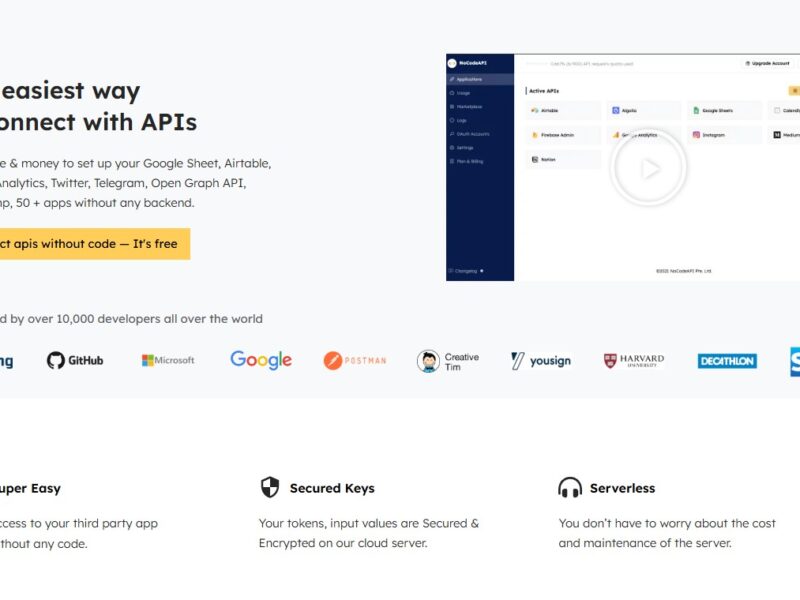
NoCodeAPI is an innovative platform that allows users to build and integrate APIs without any coding knowledge. It provides a simplified interface for connecting and using various APIs, making it accessible to non-developers, businesses, and startups. The platform removes the technical barriers to API usage, enabling users to integrate services, automate workflows, and create powerful applications without writing a single line of code.
With NoCodeAPI, users can streamline data exchanges between apps, connect third-party services, and create automated processes, all while minimizing development time and resources. This tool is perfect for businesses and individuals looking to leverage APIs to enhance their digital tools without hiring developers or learning complex programming languages.
Features
-
Pre-Built API Integrations
NoCodeAPI offers a wide range of pre-built API integrations, including popular platforms like Google Sheets, Airtable, Stripe, and more. This makes it easy for users to connect different services with minimal effort. -
Custom API Endpoints
Users can create their own custom API endpoints, tailoring the functionality to their specific needs. This allows for more flexibility in integrating and using APIs according to business requirements. -
Data Automation
NoCodeAPI allows users to automate data flows between apps, making it easier to manage and sync data across multiple platforms. This feature helps to eliminate manual data entry and reduces errors. -
Simple Interface
The platform’s user-friendly interface ensures that even those with little to no technical background can easily create and manage APIs. With drag-and-drop functionality, setting up workflows becomes intuitive and straightforward. -
Authentication & Security
NoCodeAPI ensures secure API access by offering authentication mechanisms such as API keys and OAuth. This helps users protect their data and maintain privacy while using external services. -
Real-Time Updates
The platform supports real-time updates, ensuring that any changes made to data are reflected instantly across all connected platforms. This is particularly useful for businesses that require up-to-date information at all times. -
Collaboration Features
NoCodeAPI supports team collaboration, allowing multiple users to work on the same project. This makes it easier for teams to work together and manage integrations effectively.
Pros & Cons
Pros:
-
No Coding Required: The primary benefit of NoCodeAPI is its ability to simplify API integration for those with no programming experience. This democratizes API usage, making it accessible to a broader audience.
-
Quick Setup: With pre-built integrations and a simple interface, users can set up their desired API connections in a matter of minutes, saving valuable time.
-
Cost-Effective: By eliminating the need for a developer or technical expert, NoCodeAPI offers a cost-effective solution for businesses that want to leverage APIs without investing in development resources.
-
Flexibility: NoCodeAPI allows users to create custom API endpoints, providing flexibility to accommodate unique business needs and processes.
-
Scalability: As businesses grow, NoCodeAPI can scale with them, enabling the integration of more services and automation of complex workflows.
Cons:
-
Limited Advanced Customization: While NoCodeAPI is excellent for users without technical expertise, those who need highly customized, complex API integrations may find the platform’s features limiting.
-
Platform Dependency: NoCodeAPI is a third-party service, which means you’re dependent on the platform’s stability and availability. If the service experiences downtime, it could disrupt your API integrations.
-
Learning Curve for New Users: While the platform is easy to use, there can still be a learning curve for those who have never worked with APIs before. It may take some time to understand the functionality and best practices.
-
Limited Free Features: NoCodeAPI offers a free tier, but more advanced features and integrations require a paid plan. This might be a barrier for small businesses or startups with limited budgets.
Use Cases of NoCodeAPI:
-
Automating Data Sync Between Apps
NoCodeAPI is an excellent tool for automating data synchronization between apps like Google Sheets, Airtable, and CRM systems. For example, businesses can automatically update customer records or financial data across multiple platforms, saving time and reducing human error. -
Building Custom Web and Mobile Applications
With NoCodeAPI, users can integrate third-party services and APIs into their web and mobile applications without writing complex code. This is especially useful for startups and entrepreneurs looking to launch an MVP (Minimum Viable Product) quickly. -
Creating Custom Dashboards
Businesses can use NoCodeAPI to pull data from various sources and display it in custom dashboards for better decision-making. By connecting APIs to a visualization tool, users can create dynamic, real-time reporting systems. -
Automating Payment Systems
NoCodeAPI’s integration with payment platforms like Stripe allows businesses to automate billing, invoicing, and payments without manual intervention, streamlining their financial operations. -
Enhancing Marketing Automation
Marketing teams can use NoCodeAPI to integrate email marketing platforms, CRMs, and analytics tools. This helps automate marketing campaigns, customer segmentation, and lead management, improving overall marketing efficiency.
NoCodeAPI Compared to Other Tools
-
NoCodeAPI vs. Zapier
Zapier is another popular no-code automation tool that connects apps and automates workflows. While Zapier focuses on creating “Zaps” for task automation between apps, NoCodeAPI specializes in API integrations with more control over custom endpoints. NoCodeAPI offers more flexibility for building personalized workflows, whereas Zapier is better for basic task automation. -
NoCodeAPI vs. Integromat (Make)
Integromat, now known as Make, offers a more complex and powerful automation platform compared to NoCodeAPI. It supports a wider range of integrations and offers advanced features for power users. However, NoCodeAPI is simpler and more approachable for beginners, providing an easier entry point for users without coding experience. -
NoCodeAPI vs. Bubble
Bubble is a no-code platform for building web applications, while NoCodeAPI is primarily focused on simplifying API integrations. Bubble allows for full web app development without code, whereas NoCodeAPI helps non-developers connect APIs and automate workflows with a minimal learning curve. -
NoCodeAPI vs. Pipedream
Pipedream is a serverless platform that allows developers to create integrations and workflows. NoCodeAPI, on the other hand, is aimed at users without coding expertise and offers a more user-friendly interface for creating API connections and automations. While Pipedream is more suited for developers, NoCodeAPI is ideal for non-technical users looking for simplicity.
NoCodeAPI is a game-changing platform that makes API integration accessible to non-technical users. Its intuitive interface, pre-built integrations, and customizable API endpoints allow businesses and individuals to automate workflows, sync data, and enhance their digital tools without needing to write any code. While it may have limitations for advanced use cases and complex customizations, it offers an ideal solution for startups, small businesses, and teams looking to streamline their operations and improve efficiency.
If you’re looking for a simple and cost-effective way to integrate APIs and automate your business processes, NoCodeAPI is a powerful platform that can help you achieve those goals without the need for extensive technical expertise.
FAQs
-
Is NoCodeAPI completely free to use?
NoCodeAPI offers a free tier with basic features and integrations, but more advanced functionality, such as custom endpoints and premium integrations, requires a paid plan. -
Can I use NoCodeAPI for complex API integrations?
While NoCodeAPI is excellent for simple and moderate API integrations, more complex integrations may require custom development or the use of other advanced tools. -
What integrations does NoCodeAPI support?
NoCodeAPI supports a wide range of integrations, including popular services like Google Sheets, Airtable, Stripe, Twilio, and many more. -
Do I need coding skills to use NoCodeAPI?
No, NoCodeAPI is designed for users without coding skills. Its drag-and-drop interface and pre-built integrations make it accessible for non-developers. -
Can I use NoCodeAPI to build mobile apps?
While NoCodeAPI itself is not a full app builder, it can be used to integrate APIs and automate data flow for mobile apps built using no-code platforms like Adalo or Glide.