
Flot
What Is Flot?
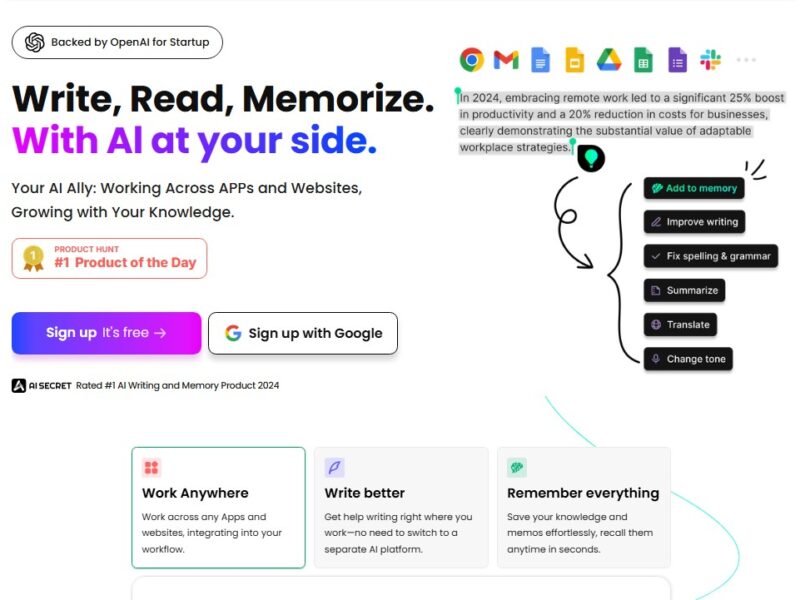
Flot is an AI productivity tool designed to provide contextual assistance across applications and websites. It allows users to interact with AI by selecting text anywhere on their screen and performing actions such as rewriting, summarizing, translating, or explaining content instantly.
Rather than functioning as a standalone chatbot, Flot integrates into everyday workflows. Its goal is to reduce context switching and make AI support available exactly where and when it is needed.
Key Features of Flot
Universal AI Integration
Flot works across browsers, documents, email clients, and web-based tools. Users can activate AI actions without leaving the current app or website.
AI Writing and Editing Assistance
Flot helps users:
-
Rewrite text for clarity and tone
-
Improve grammar and structure
-
Generate new content ideas
-
Expand or shorten existing text
Summarization and Explanation
Long articles, emails, or documents can be summarized into concise insights. Complex text can also be simplified or explained in plain language.
Translation and Multilingual Support
Flot supports a large number of languages, enabling translation and multilingual content generation for global users.
AI Memory and Knowledge Saving
Users can save important information, notes, or insights into Flot’s memory system, allowing the AI to recall and reuse knowledge over time.
Contextual Text Actions
By highlighting text, users can immediately choose actions such as:
-
Rewrite
-
Summarize
-
Translate
-
Improve tone
-
Explain meaning
Pros & Cons
Pros:
-
Works across multiple apps and websites
-
Reduces time spent switching between tools
-
Supports writing, summarization, and translation in one place
-
Useful for both professional and personal workflows
-
AI memory helps retain and reuse information
Cons:
-
Advanced features may require a paid subscription
-
New users may need time to learn all capabilities
-
Requires an internet connection to function
-
Less customizable than some standalone AI platforms
Use Cases:
Content Creation
Writers, bloggers, and marketers can draft, edit, and refine content directly in their publishing tools or browsers.
Business and Professional Communication
Professionals can improve emails, reports, and presentations while maintaining a consistent and professional tone.
Students and Researchers
Students can summarize academic material, translate sources, and simplify complex topics for better understanding.
Multilingual Collaboration
Flot supports cross-language communication by translating messages and documents in real time.
Everyday Browsing and Learning
Users can summarize long articles, understand technical content, or rewrite text for personal use while browsing the web.
Compared to Other AI Tools
Many AI tools focus on specific environments or tasks. Flot differentiates itself by emphasizing universal access and contextual use.
Compared to Grammar-Focused Tools
Unlike grammar-only tools, Flot provides broader AI capabilities, including content generation, summarization, and translation.
Compared to Workspace-Specific AI
Some AI assistants work only within certain platforms. Flot operates across websites and applications, making it more flexible.
Compared to Standalone AI Chatbots
Traditional chatbots require copying and pasting content into a separate interface. Flot eliminates this extra step by working directly on selected text.
Flot is designed for users who want AI assistance embedded directly into their daily workflow. By combining writing support, summarization, translation, and memory features into a single universal tool, it offers a practical approach to AI-driven productivity.
While it may not replace specialized AI platforms for advanced customization, Flot excels at making AI accessible, fast, and context-aware. For professionals, students, and everyday users, it represents a convenient way to integrate AI into routine digital tasks.
FAQs
1. What is Flot used for?
Flot is used for writing, editing, summarizing, translating, and explaining text directly within apps and websites.
2. Do I need to switch apps to use Flot?
No. Flot works inside your existing workflow, allowing you to use AI without leaving your current application or webpage.
3. Is Flot suitable for professional use?
Yes. Flot is commonly used for business communication, content creation, research, and productivity tasks.
4. Does Flot support multiple languages?
Yes. Flot supports a wide range of languages for translation and multilingual content creation.
5. Is Flot free?
Flot typically offers a free tier with limitations, while advanced features and higher usage are available through paid plans.