
Clip Studio
What is Clip Studio?
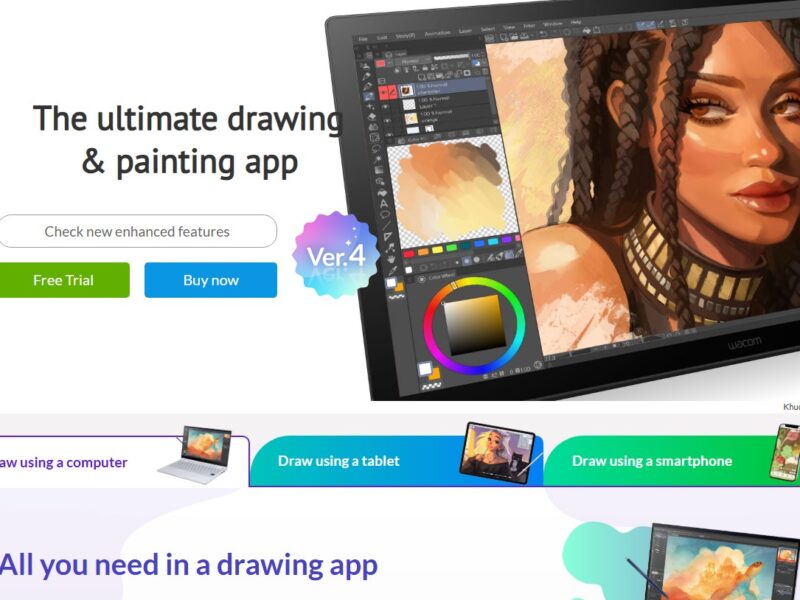
Clip Studio is a powerful, all-in-one software for digital drawing and painting. Developed by CELSYS, it caters to professional creators in various artistic fields, from illustration and comic creation to animation and 3D modeling. Clip Studio is renowned for its intuitive user interface, advanced tools, and compatibility with graphics tablets. Whether you’re working on detailed character designs, complex comic panels, or high-quality animations, Clip Studio offers everything needed for efficient and creative digital artwork production.
Clip Studio is available for both Windows and macOS and offers multiple versions, including a Pro version for hobbyists and an EX version for professionals with advanced features like multi-page comic creation and animation.
Features
1. Drawing Tools
Clip Studio provides an impressive array of drawing tools, including customizable brushes, pens, and pencils that mimic traditional mediums such as ink, watercolors, and oil paints. Artists can fine-tune the texture, size, and pressure sensitivity for a truly personalized experience.
2. Comic & Manga Creation
Clip Studio is particularly favored by comic artists due to its specialized tools for comic creation. Features like panel layouts, speech bubble generation, perspective rulers, and pre-designed comic page templates streamline the process of creating both manga and traditional comic books.
3. Animation Tools
For animators, Clip Studio offers an intuitive timeline for creating frame-by-frame animations. You can easily add motion to characters and objects, adjust timing, and preview your animation in real-time. The software supports 2D and 3D animation and even allows you to import 3D models to use as reference or for base animation.
4. 3D Models & Pose Tools
One of the standout features of Clip Studio is its 3D model library. Artists can use pre-made 3D models of human figures, animals, objects, and backgrounds. These models can be customized, posed, and used as a reference for drawing, making it easier to create realistic and dynamic artwork.
5. Text and Typography Tools
Clip Studio also includes advanced text tools for creating dialogue and captions in comics and illustrations. You can easily adjust the font style, size, color, and position, making it ideal for adding dialogue or creating promotional art.
6. Cloud Integration
With Clip Studio Cloud, users can save and sync their artwork across devices. This integration also allows for easy sharing and collaboration with other artists or clients.
7. Extensive Asset Library
Clip Studio offers a vast library of brushes, materials, and templates, both free and paid, that can help speed up the creative process. These assets can be used for everything from textures to backgrounds and character accessories.
Pros & Cons
Pros:
-
Comprehensive Toolset: Clip Studio offers a broad range of tools for both illustration and animation, making it a one-stop solution for digital artists.
-
User-Friendly Interface: The software is designed to be intuitive, even for beginners, while still providing advanced features for professionals.
-
High Customizability: Artists can create and modify their brushes, tools, and layouts, offering a personalized working environment.
-
Strong Comic and Manga Support: Specialized features for comic and manga creation, including panel layout tools and speech bubbles, make it a top choice for comic artists.
-
3D Integration: The ability to import and manipulate 3D models for reference or background art is a unique feature that saves time and improves accuracy.
-
Affordable Pricing: Clip Studio offers a more affordable option compared to some other professional digital art software, with a one-time purchase option (Pro version) and subscription plans for cloud services.
Cons:
-
Learning Curve: While user-friendly, the range of features can overwhelm beginners who may find the software’s full potential difficult to navigate without tutorials.
-
Limited Photo Editing Tools: Clip Studio focuses more on drawing and illustration, so it lacks the robust photo editing tools found in programs like Adobe Photoshop.
-
Animation Limitations: While Clip Studio supports animation, its animation tools are not as advanced or feature-rich as those found in dedicated animation software like Toon Boom or Adobe Animate.
-
Resource Intensive: The software can be resource-heavy, especially when working with multiple layers or 3D models, which could slow down lower-end systems.
Use Cases for Clip Studio:
1. Illustration and Digital Painting
Clip Studio is ideal for illustrators working in various styles, from realistic digital painting to stylized cartoon or anime-style art. The software’s brush engine and layer system allow for intricate detailing and vibrant color work.
2. Comic & Manga Creation
Artists creating comics and manga will find Clip Studio’s specialized tools extremely useful. The software helps streamline workflows by providing customizable comic pages, panel layouts, perspective rulers, and built-in features for managing multiple pages at once.
3. Animation Projects
For creators working on 2D animation, Clip Studio is a solid option. It’s especially suited for frame-by-frame animation and character animation, as it allows users to work with both 2D and 3D models, adding depth and motion to their creations.
4. Storyboarding
For animators and filmmakers, Clip Studio is also a great tool for creating storyboards. With its drawing tools and integration of 3D models, artists can quickly visualize scenes, camera angles, and character movements.
5. Character Design and Concept Art
Clip Studio’s powerful drawing tools, 3D models, and pose references make it a great tool for character design and concept art. Artists can iterate on designs quickly, making it easier to bring characters to life.
Clip Studio Compared to Other Tools
Compared to Adobe Photoshop
-
Cost: Clip Studio is generally more affordable than Adobe Photoshop, especially with its one-time purchase option. Photoshop uses a subscription model, which can become expensive over time.
-
Focus: Photoshop is more versatile for general photo editing and graphic design, whereas Clip Studio is specialized for digital painting, illustration, and comic creation.
-
Brush Customization: Both programs offer brush customization, but Clip Studio is specifically known for its highly customizable brushes that mimic traditional media, making it a top choice for artists focused on illustration.
Compared to Procreate
-
Platform: Procreate is available exclusively for iOS devices, making it ideal for tablet users, while Clip Studio is available on both Windows and macOS, offering more flexibility for desktop users.
-
Functionality: Clip Studio offers more advanced tools for comic creation, animation, and 3D model manipulation, which Procreate does not. However, Procreate is simpler to use and may be better suited for quick sketches and painting.
-
Animation: Clip Studio provides more robust animation tools compared to Procreate, making it a better option for animators.
Compared to Krita
-
Free vs. Paid: Krita is a free, open-source program that offers many features similar to Clip Studio, including advanced brush engines and painting tools. However, Clip Studio provides more specialized features for comic creation, animation, and 3D model integration.
-
User Interface: Clip Studio tends to have a more polished and professional interface, whereas Krita’s interface can be more challenging to navigate for beginners.
-
Tools for Comics: Clip Studio’s tools for comic creation, including panel layouts, rulers, and speech bubbles, are far more advanced than those in Krita.
Clip Studio is a highly versatile and powerful digital art software that caters to artists across various fields, including illustration, comics, animation, and concept art. With its affordable pricing, robust feature set, and user-friendly interface, Clip Studio stands as one of the top choices for digital artists. Whether you’re a hobbyist looking to try your hand at digital painting or a professional comic artist, Clip Studio provides everything you need to create stunning, detailed artwork.
While it may not be as feature-rich as some competitors in areas like photo editing or 3D modeling, Clip Studio excels in its core focus on illustration and animation, making it a worthwhile investment for anyone in the digital art space.
FAQs
1. What is Clip Studio used for?
Clip Studio is primarily used for digital drawing, painting, comic creation, and animation. It provides tools for artists to create high-quality artwork, from detailed illustrations to 2D animations.
2. Is Clip Studio good for beginners?
Yes, Clip Studio offers an intuitive interface, and while it has a learning curve, there are plenty of tutorials and resources available to help beginners get started with digital art.
3. Can I create animations with Clip Studio?
Yes, Clip Studio has animation tools that allow users to create frame-by-frame 2D animations. It also supports 3D models for reference and base animation.
4. Is Clip Studio better than Photoshop for digital painting?
For digital painting and illustration, many artists prefer Clip Studio due to its specialized brushes and drawing tools. While Photoshop is a more versatile program, Clip Studio excels in areas like comic creation and painting with traditional media effects.
5. How much does Clip Studio cost?
Clip Studio offers different pricing plans, including a one-time purchase for the Pro version and a subscription model for the