
Headshotly
What is Headshotly?
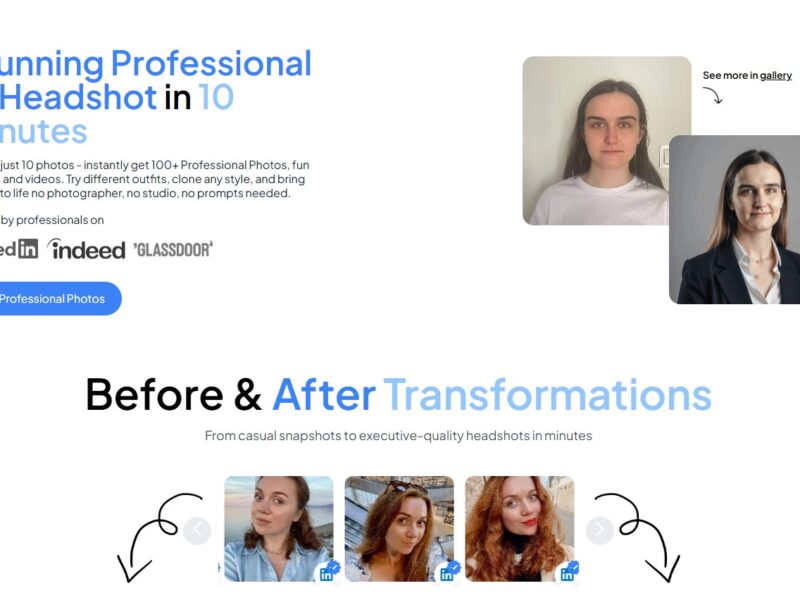
Headshotly is an innovative AI-powered platform designed to generate high-quality, professional headshots from user-uploaded photos. By leveraging advanced machine learning algorithms, Headshotly can transform ordinary selfies or casual photos into polished, studio-quality headshots. This tool is perfect for professionals looking to update their online profiles or businesses needing uniform, high-quality headshots for their teams, without the hassle of scheduling a traditional photoshoot.
The platform is accessible to users at any skill level, offering an intuitive interface that simplifies the process of creating headshots. Whether you’re a business professional, a freelancer, or an entrepreneur, Headshotly streamlines the headshot creation process and offers a more affordable and efficient alternative to traditional methods.
Features
-
AI-Powered Image Enhancement
Headshotly utilizes artificial intelligence to improve the quality of user-uploaded photos, adjusting lighting, background, and overall aesthetics to match the standards of a professional headshot. -
Variety of Background Options
Users can choose from multiple background styles and colors, allowing for personalized and polished headshots that suit their branding or the image they wish to project. -
Real-Time Previews
Before finalizing your headshot, Headshotly offers real-time previews, letting users see how their image will look once enhanced. This gives the flexibility to make adjustments before the final output. -
Customizable Features
Headshotly allows users to tweak key elements of their headshots, such as brightness, contrast, and sharpness. You can also adjust your appearance to highlight specific features like facial expressions and positioning. -
Multiple File Formats
The platform offers the ability to download your headshot in various file formats, including high-resolution versions suitable for printing or sharing online. -
Quick Processing Time
With AI at the core, the platform processes images quickly, delivering professional-quality headshots in just a few minutes—much faster than traditional methods.
Pros & Cons
Pros:
-
Cost-Effective
Traditional professional headshots can be expensive, especially when factoring in photographer fees and studio rentals. Headshotly offers a more affordable solution, providing high-quality results at a fraction of the cost. -
Time-Saving
Rather than scheduling a photoshoot and waiting for the photographer to edit your images, Headshotly allows you to upload a photo and receive a polished headshot within minutes. -
Ease of Use
The platform is designed for users of all technical abilities. You don’t need to be a photographer or image editor to create a professional-looking headshot. -
High-Quality Results
Despite the automated nature of the process, the final product from Headshotly is indistinguishable from a traditional studio headshot. The AI enhancements ensure that the image is crisp, clean, and polished. -
Multiple Use Cases
Whether you need headshots for your LinkedIn profile, company website, or personal branding, Headshotly is versatile and can meet various professional needs.
Cons:
-
Limited Control Over Details
While Headshotly provides some customization options, users have limited control over the finer details of their headshot (e.g., precise facial feature adjustments), compared to a traditional photographer’s ability to tweak poses and expressions. -
Dependence on Uploaded Image Quality
The quality of the final headshot depends on the quality of the original photo uploaded. While Headshotly enhances the image, poor-quality photos may still result in suboptimal outcomes. -
No Physical Interaction
Unlike in-person photoshoots, users miss out on the photographer’s guidance for posture, expression, and framing. While the AI handles most of this, it might not fully replicate the personalized touch of a professional photographer. -
Background Customization Limitations
While there are several background options, the customization is somewhat limited compared to a traditional photoshoot where you can select specific props or settings to match your professional identity.
Use Cases of Headshotly:
-
Business Professionals
Whether you’re updating your LinkedIn profile or preparing for a networking event, Headshotly is an ideal solution for business professionals looking to create a sharp, professional image without the need for a formal photoshoot. -
Freelancers & Entrepreneurs
Freelancers and entrepreneurs who rely on online platforms for client interaction and business development can use Headshotly to create a high-quality headshot that enhances their personal brand. -
HR & Recruitment Agencies
HR departments or recruitment agencies can use Headshotly to create professional headshots for employees or candidates, ensuring a consistent and professional image for company profiles, resumes, or promotional materials. -
Social Media Profiles
Content creators, influencers, and individuals with a large social media following can benefit from Headshotly’s ability to create polished images that elevate their professional online presence. -
Company Teams
Headshotly can be used by companies to provide employees with consistent, high-quality headshots for team pages, press releases, or other internal and external corporate communications.
Headshotly Compared to Other Tools
Headshotly vs. Traditional Photoshoots
Traditional headshots usually involve booking a session with a professional photographer, selecting a location, and going through the entire process of posing, lighting adjustments, and post-production editing. While traditional photoshoots provide more personalized attention and control, Headshotly offers a faster, more cost-effective solution, especially for those on tight schedules or budgets.
However, for those who require specific posing instructions or a highly customized photoshoot experience, traditional methods may still be preferred.
Headshotly vs. Other AI Headshot Tools
When compared to other AI-based headshot platforms like Generated Photos or Remini, Headshotly stands out due to its user-friendly interface, customizable backgrounds, and real-time image previews. While other tools may focus on creating avatars or stylized images, Headshotly specializes in producing professional, realistic headshots suitable for business and personal branding.
Headshotly vs. Smartphone Apps
There are a number of smartphone apps that claim to enhance photos into headshots. However, most of these apps lack the precision and quality that Headshotly’s AI-driven platform provides. The platform also gives users access to high-resolution, professional-quality images, which many smartphone apps cannot match.
Headshotly is a game-changer for anyone needing a professional headshot without the time and expense of a traditional photoshoot. By leveraging AI, it offers an efficient, cost-effective solution that delivers high-quality results in minutes. With its customizable features, quick processing times, and ease of use, Headshotly is an excellent tool for business professionals, freelancers, recruiters, and anyone who wants to enhance their personal or corporate brand.
However, those who need more control over their final image or a more personalized photoshoot experience may still prefer traditional photography methods. Overall, for those looking for a simple, affordable, and quick way to create professional headshots, Headshotly is an excellent choice.
FAQs
1. How do I create a professional headshot with Headshotly?
Simply upload a high-quality photo of yourself, and Headshotly’s AI will automatically enhance the image, adjust lighting and background, and refine the overall appearance to create a polished headshot.
2. Can I use Headshotly for company-wide headshots?
Yes, Headshotly is ideal for businesses looking to create uniform headshots for employees. You can easily upload individual photos and generate professional headshots for your entire team.
3. What file formats can I download my headshot in?
Headshotly allows you to download your final headshot in various formats, including high-resolution files that are suitable for printing, as well as smaller sizes for use on websites or social media.
4. Can I adjust the background of my headshot?
Yes, Headshotly provides a range of background options, including solid colors and professional settings. You can select the background that best suits your style or branding.
5. How long does it take to create a headshot on Headshotly?
Once you upload your photo, Headshotly’s AI processes and enhances the image in just a few minutes, allowing you to quickly preview and download your professional headshot.