
Inbox2Action
What is Inbox2Notion?
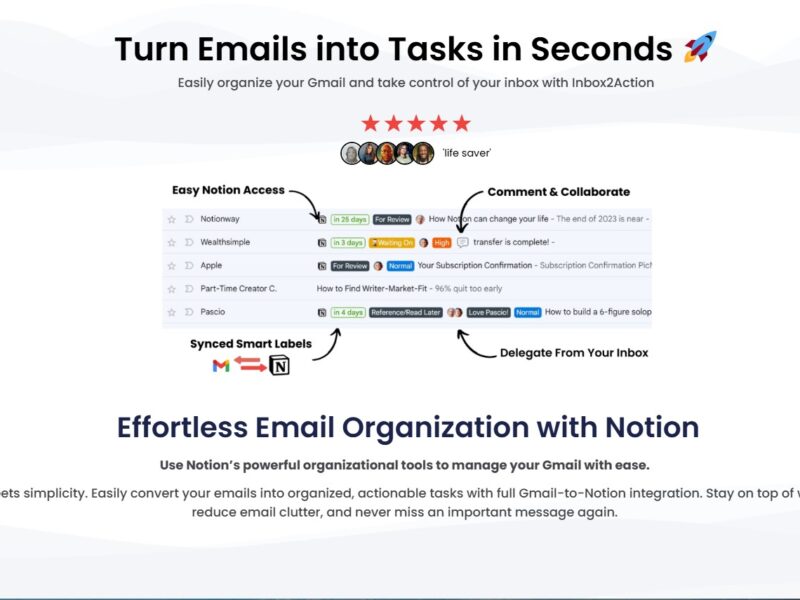
Inbox2Notion is a productivity tool that allows you to forward emails or other content from your inbox directly into Notion, an all-in-one workspace for note-taking, task management, and collaboration. Notion is widely used for personal and team productivity, and Inbox2Notion makes it easier to transfer important information from emails to Notion without the need for manual copying and pasting. By automating this process, Inbox2Notion helps you stay organized and ensures that you never miss important tasks, reminders, or notes from your inbox.
Features
-
Email Forwarding to Notion
Inbox2Notion’s primary feature is its ability to forward emails directly to your Notion workspace. This integration allows users to create new pages or add content to existing pages within Notion just by forwarding an email to a specific address provided by Inbox2Notion. -
Customizable Notion Templates
Inbox2Notion allows users to create custom templates for the emails they forward to Notion. These templates can be used to automatically structure incoming emails into the desired format (e.g., tasks, notes, or to-do lists), saving you time in organizing information. -
Automated Task Creation
The tool enables automatic task creation from emails, transforming email content into actionable tasks within Notion. This is especially useful for teams or individuals who use Notion for project management or task tracking. -
Multi-Platform Compatibility
Inbox2Notion integrates seamlessly with Notion and works across different platforms, ensuring that users can forward content from their preferred email provider (e.g., Gmail, Outlook) to Notion, regardless of the device they’re using. -
Organized and Structured Workflow
With Inbox2Notion, all incoming data from emails is automatically added to the relevant Notion pages or sections, ensuring that information is organized and easily accessible. Users can set up specific rules for where emails go, streamlining their workflow. -
Simple Setup Process
Inbox2Notion offers an easy-to-follow setup process. You only need to link your email account with the tool, customize your forwarding preferences, and start forwarding emails to Notion. -
Data Privacy and Security
Inbox2Notion takes user data privacy seriously. The tool uses secure encryption methods to protect the data you send between your inbox and Notion, ensuring your information remains confidential.
Pros & Cons
Pros:
-
Streamlined Workflow: Inbox2Notion simplifies the process of transferring information from emails to Notion, reducing the need for manual copying and pasting.
-
Time-Saving: The ability to automatically create tasks or notes from emails directly within Notion saves you valuable time, especially for users who manage multiple projects.
-
Customizable Templates: The option to set up custom templates allows users to tailor the tool to their specific workflow and ensure emails are organized in a consistent format.
-
Multi-Device Support: Inbox2Notion works on various devices and integrates with most popular email platforms, ensuring flexibility and ease of use.
-
Enhanced Organization: The automatic categorization of emails into specific Notion pages or sections ensures that all information is organized and accessible in one place.
Cons:
-
Limited to Notion: Since Inbox2Notion is specifically designed for integration with Notion, it’s not suitable for users who rely on other note-taking or project management tools.
-
Dependence on Email: The tool relies on email for forwarding information, meaning users need to manually forward emails or set up forwarding rules. It might not be fully automated for all scenarios.
-
Free Version Limitations: While Inbox2Notion offers a free version, some features (like advanced customization or unlimited integrations) are only available in the paid plan.
-
Not Ideal for Complex Workflows: For highly complex project management needs, Inbox2Notion may not be as robust as full-featured project management platforms like Asana or Trello.
Use Cases for Inbox2Notion:
-
Task Management
Inbox2Notion is ideal for individuals and teams who manage tasks via email. By automatically converting email content into tasks or to-dos within Notion, users can ensure they never miss an important action item. -
Project Management
For project managers using Notion for collaboration, Inbox2Notion allows for seamless integration with email communication. Emails with project updates, deadlines, or action items can be forwarded directly into the relevant Notion pages. -
Personal Productivity
Individuals can use Inbox2Notion to manage their personal tasks and notes by forwarding important emails (e.g., reminders, personal notes, or research) into Notion, keeping all information in one organized space. -
Team Collaboration
Teams who use Notion as their central hub for collaboration can use Inbox2Notion to quickly share email content with colleagues. Emails about meetings, tasks, or updates can be forwarded into shared Notion workspaces for easy reference. -
Business Organization
Entrepreneurs and small business owners can streamline their operations by forwarding business-related emails (e.g., client updates, invoices, or orders) directly into Notion, ensuring all business data is in one accessible place.
Inbox2Notion Compared to Other Tools
When compared to other productivity tools like Zapier, IFTTT, and Notion’s native integrations, Inbox2Notion has several unique advantages and limitations:
-
Zapier: While Zapier offers broad automation capabilities, Inbox2Notion is more focused and tailored specifically for sending email content to Notion. For users who only need email-to-Notion integration, Inbox2Notion offers a simpler, more streamlined solution.
-
IFTTT: Like Zapier, IFTTT offers a range of integrations, but it lacks the specialized focus on Notion that Inbox2Notion provides. For users who need a straightforward way to forward emails to Notion, Inbox2Notion is a more direct solution.
-
Notion’s Native Integrations: Notion itself offers some integrations and templates, but Inbox2Notion adds a more seamless email-to-Notion functionality. Notion’s integrations tend to be more general, while Inbox2Notion is purpose-built for efficient email management within Notion.
Inbox2Notion is an invaluable tool for individuals and teams looking to streamline their workflow by automating the process of transferring email content into Notion. With features like customizable templates, automated task creation, and multi-platform compatibility, Inbox2Notion makes managing tasks, projects, and information effortless. While it’s specifically designed for Notion users, its simplicity and ease of use make it an excellent addition to any Notion-based productivity setup. If you’re looking for a way to stay organized and integrate your email communication into your Notion workflow, Inbox2Notion is a tool worth considering.
FAQs
1. Is Inbox2Notion free to use?
Inbox2Notion offers a free version with limited features, such as fewer email forwarding options and customization. For advanced features, you can subscribe to the paid version.
2. How do I set up Inbox2Notion?
Setting up Inbox2Notion is simple. After signing up, you link your email account, set your preferences, and start forwarding emails to your custom Notion workspace using the unique forwarding address provided by the tool.
3. Can I forward all types of emails to Notion?
Yes, Inbox2Notion can handle a wide range of email content, including plain text, HTML, and attachments. However, complex email formats or large attachments may require some manual adjustments.
4. Does Inbox2Notion support all email providers?
Yes, Inbox2Notion supports most major email providers, including Gmail, Outlook, and others, allowing you to forward emails from virtually any inbox.
5. Can I use Inbox2Notion for team collaboration?
Yes, Inbox2Notion is great for team collaboration. Teams using Notion can forward emails directly into shared Notion workspaces, making it easy to organize and track important emails, updates, and tasks.