
Camel
What is Clay?
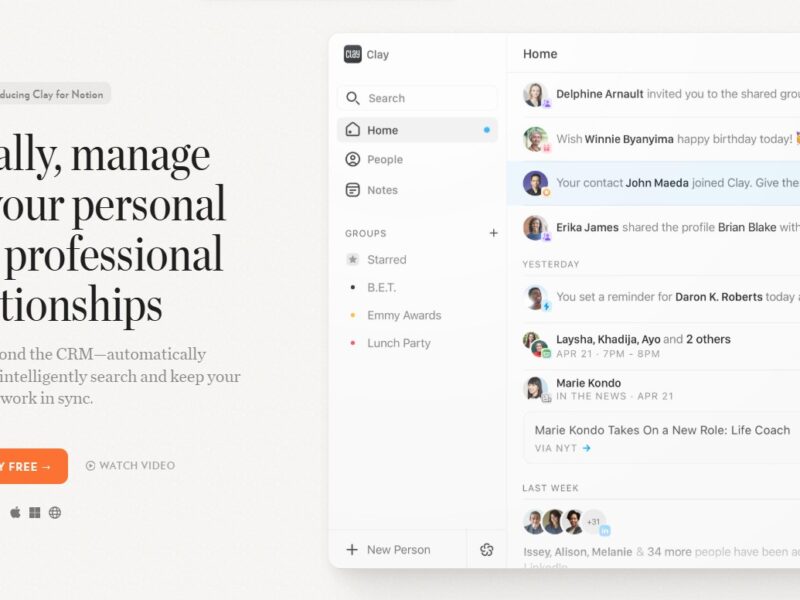
Clay is a powerful no-code platform designed to help individuals and businesses organize, visualize, and automate workflows, data, and tasks in one unified space. With a focus on flexibility, ease of use, and customization, Clay aims to bring productivity tools and personalized workflows together without needing any technical expertise. This platform integrates with various apps, including Google Sheets, Slack, and CRM systems, offering a unique solution for data management and automation.
In this article, we’ll explore what Clay is, its features, benefits, potential drawbacks, common use cases, and how it compares to other similar tools in the market. We’ll also answer some frequently asked questions to provide you with a complete understanding of Clay.
Features
Clay provides an extensive set of features that make it an attractive tool for businesses and individuals looking to streamline their operations and workflows.
-
Customizable Dashboards
Clay allows users to build custom dashboards to visualize data, monitor workflows, and track progress in real-time. These dashboards can be tailored to specific needs, making it a versatile option for many industries. -
Automation and Workflows
Clay enables the creation of automation scripts that can trigger actions based on specific conditions, reducing the need for manual intervention. Whether it’s sending reminders or triggering emails, workflows can be configured to automate repetitive tasks. -
Data Integrations
Clay integrates seamlessly with popular tools like Google Sheets, Salesforce, and Slack, making it easy to connect data from various sources. These integrations allow you to consolidate information and avoid data silos. -
Collaboration Tools
Clay also promotes team collaboration by offering tools for sharing workflows, tasks, and updates. You can assign tasks, add comments, and track progress collaboratively, all in one place. -
No-Code Platform
Clay is a no-code platform, meaning users don’t need to write a single line of code to create and manage workflows. This makes it highly accessible for non-technical users, yet powerful enough for more advanced use cases.
Pros and Cons
Pros
-
Ease of Use
Clay is designed with user-friendliness in mind. Its intuitive interface allows users to create and manage workflows without requiring coding knowledge. -
Customization
The ability to customize dashboards, workflows, and integrations is a significant advantage, as it caters to different business needs and user preferences. -
Robust Integrations
With support for a wide range of integrations, Clay eliminates the need for manual data entry, ensuring seamless data flow between systems. -
Time-Saving Automation
Clay’s automation features help businesses save time by automating repetitive tasks and allowing teams to focus on higher-priority work. -
Collaboration Features
The platform’s collaboration tools foster team communication, task management, and shared updates, improving overall productivity.
Cons
-
Learning Curve for Advanced Features
While Clay is easy to get started with, the more advanced features and integrations may take some time to master. -
Pricing
For small businesses or individual users, Clay’s pricing model may be a bit high compared to simpler task management tools. -
Limited Template Library
Although highly customizable, Clay has fewer pre-built templates compared to other tools, which may require users to invest more time in creating workflows from scratch. -
Limited Offline Functionality
Since Clay is a cloud-based platform, its offline capabilities are limited, which may be an issue for some users working in areas with unstable internet connectivity.
Use Cases of Clay:
1. Customer Relationship Management (CRM)
Clay can be used as an effective CRM tool by consolidating customer data, tracking interactions, and automating follow-ups. It allows businesses to manage their customer relationships from a central location.
2. Project Management
With customizable dashboards and task management features, Clay is suitable for organizing and tracking project progress. You can automate reminders, set deadlines, and assign tasks to specific team members.
3. Data Management and Reporting
Clay’s integration with Google Sheets and other tools makes it ideal for managing large amounts of data. Users can visualize key metrics and generate real-time reports to track business performance.
4. Marketing Campaigns
For marketing teams, Clay’s automation and workflow features allow you to track campaign performance, send automated email campaigns, and measure engagement—all in one tool.
5. Human Resources
HR teams can leverage Clay for tracking employee performance, managing payroll, and handling recruitment workflows. It’s an ideal tool for streamlining HR processes and improving internal communication.
Clay vs Other Tools
When compared to other tools like Airtable, Notion, or Zapier, Clay offers a unique blend of simplicity and functionality. Let’s take a quick look at how Clay compares:
-
Airtable: Airtable is often seen as a more powerful database management tool with advanced relational database capabilities. While it offers many features similar to Clay, Airtable requires more technical knowledge to create complex workflows and automations. Clay, on the other hand, is designed for users without coding expertise.
-
Notion: Notion is a great tool for note-taking, knowledge management, and project planning, but it lacks the deep integration and workflow automation that Clay offers. Clay provides more specialized features for automating tasks and managing external data sources, making it a better option for workflow-heavy businesses.
-
Zapier: Zapier focuses on automating tasks by connecting different apps. While it’s excellent for task automation, it doesn’t offer the same level of in-depth customization and data visualization as Clay. For users seeking both workflow automation and data management in one platform, Clay is a more comprehensive solution.
Clay is a versatile, no-code platform that can significantly enhance the productivity of businesses and individuals by offering customizable workflows, data integrations, and time-saving automations. Its user-friendly interface and robust set of features make it an excellent choice for people looking to simplify complex tasks without requiring coding skills.
However, it may not be ideal for every business. Small businesses or startups with tight budgets may find the pricing model a bit restrictive, and advanced users may face a learning curve when trying to fully utilize the platform’s capabilities. Overall, Clay offers significant value for teams and professionals looking to streamline their processes and consolidate workflows.
FAQs
1. What is Clay used for?
Clay is used to organize and automate workflows, manage data, and visualize key metrics. It’s ideal for project management, customer relationship management (CRM), marketing campaigns, and more.
2. Is Clay a no-code platform?
Yes, Clay is a no-code platform, allowing users to create workflows and automations without writing any code.
3. Can Clay integrate with other tools?
Yes, Clay supports integrations with popular tools like Google Sheets, Slack, Salesforce, and more, making it easy to connect and consolidate data.
4. Is Clay suitable for small businesses?
While Clay offers powerful features, its pricing may be a bit high for small businesses or solo entrepreneurs. However, larger teams will benefit from its collaboration and automation capabilities.
5. Does Clay offer templates?
Clay offers customization options but has fewer pre-built templates compared to other tools like Airtable. Users will often need to create workflows from scratch.