
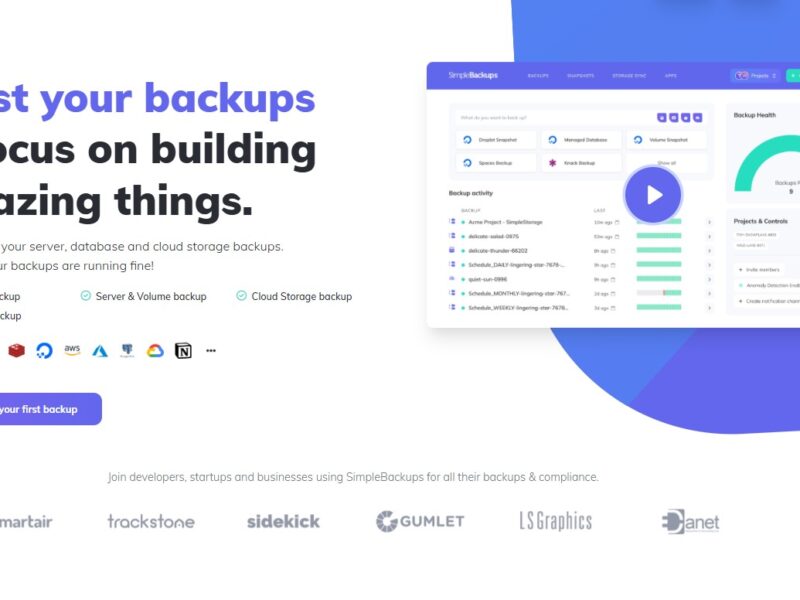
SimpleBackups
What is SimpleBackups?
SimpleBackups is a cloud-based backup solution designed to provide automated and secure data backups for websites and applications. Aimed at developers, businesses, and individuals, SimpleBackups simplifies the process of securing critical data by offering automated backups with easy setup, scheduling, and restoration options. With its straightforward interface, users can ensure that their data is regularly backed up without requiring complex configurations or manual effort.
Ideal for businesses running websites, blogs, or e-commerce stores, SimpleBackups focuses on delivering peace of mind by ensuring that, in the event of a data loss, websites can be quickly restored, minimizing downtime and potential losses.
Features
SimpleBackups offers a range of features designed to make website and data backups easy, efficient, and reliable. Key features include:
-
Automated Backups: SimpleBackups allows users to schedule automatic backups, ensuring that data is regularly backed up without any manual intervention. You can choose from daily, weekly, or monthly backup schedules based on your needs.
-
One-Click Restore: With just a click, users can restore their website or application data to a previous state. This feature is crucial for quick recovery in case of a system failure, hacking incident, or accidental data loss.
-
Cloud Storage Integration: SimpleBackups integrates with popular cloud storage services like Amazon S3, Google Drive, and Dropbox, enabling users to store their backups securely off-site.
-
Encrypted Backups: Security is a top priority, and SimpleBackups ensures that all backups are encrypted, providing an extra layer of protection for sensitive data.
-
Full Website Backups: SimpleBackups allows users to back up all website data, including databases, files, and media, ensuring that nothing is left behind during the backup process.
-
Easy-to-Use Dashboard: SimpleBackups offers a user-friendly interface that makes it easy for anyone to set up and manage backups without requiring advanced technical skills.
-
Restore Specific Files: In addition to restoring the entire website, SimpleBackups enables users to restore specific files or database tables, giving them more granular control over the recovery process.
-
Version History: SimpleBackups keeps a history of all backups, allowing users to choose from different versions to restore, based on the date and time they wish to roll back to.
Pros & Cons
Pros:
-
Ease of Use: SimpleBackups is designed with simplicity in mind. It’s easy to set up, even for users with minimal technical knowledge. The intuitive dashboard and one-click restore feature make managing backups a breeze.
-
Automated and Scheduled Backups: Once configured, SimpleBackups handles the entire backup process automatically, giving users peace of mind that their data is regularly backed up without having to remember to do it manually.
-
Multiple Cloud Integrations: SimpleBackups supports several cloud storage options, making it easy to store backups securely and in a way that suits your existing infrastructure.
-
Security Features: With encryption for backups and secure cloud storage, SimpleBackups ensures that your data is safe from unauthorized access, hacking, and other vulnerabilities.
-
Granular Restore Options: Users can restore specific files or entire websites, providing flexibility when recovering from issues like data corruption or accidental file deletions.
Cons:
-
Limited Advanced Features: While SimpleBackups excels at ease of use, it may lack some advanced features that more complex backup solutions offer, such as multi-tiered backup options or more detailed analytics.
-
Cloud Storage Costs: While SimpleBackups integrates with popular cloud storage services, users should consider the costs of storing backups in the cloud, especially for businesses with large volumes of data.
-
Backup Frequency Limitations: For users who need real-time or hourly backups, the frequency options may be limiting, as the platform primarily offers daily or weekly backups.
-
No Built-in Disaster Recovery Plans: While SimpleBackups offers backup solutions, it does not provide comprehensive disaster recovery planning, which might be necessary for large enterprises or businesses with highly critical data.
Use Cases for SimpleBackups:
SimpleBackups is versatile and can be used by a variety of individuals and businesses to secure their data and ensure business continuity. Here are some common use cases:
-
Website Owners & Bloggers: Small business owners and bloggers can use SimpleBackups to automate the backup process of their websites, ensuring that their content and databases are protected against accidental deletion, corruption, or hacking.
-
E-Commerce Businesses: E-commerce websites often rely heavily on databases for storing product information, customer details, and transaction history. SimpleBackups helps e-commerce businesses protect these critical assets with secure backups.
-
Web Developers: Developers who manage multiple client websites can use SimpleBackups to automate backups for all their client sites. This allows developers to restore websites quickly in case of a server failure or other issues.
-
Small & Medium-Sized Enterprises (SMEs): SMEs can use SimpleBackups to ensure that business-critical data, including customer records, employee files, and financial data, is protected. Regular backups mitigate the risk of data loss and ensure business continuity.
-
Non-Technical Users: SimpleBackups is ideal for non-technical users who want to ensure their data is securely backed up but don’t have the expertise or resources to manage complex backup solutions.
Compared to Other Tools
When compared to other backup tools like UpdraftPlus, BackupBuddy, and Acronis, SimpleBackups offers several advantages and disadvantages:
-
Simplicity and Ease of Use: SimpleBackups stands out in terms of ease of use. While UpdraftPlus and BackupBuddy also offer website backup features, SimpleBackups is often considered more user-friendly, with a simpler interface and fewer complex settings.
-
Automation: Like UpdraftPlus, SimpleBackups automates backups, but it stands out for its simplicity in scheduling and the minimal configuration required. However, Acronis offers more complex backup options for businesses that need advanced scheduling or backup configurations.
-
Cloud Integration: Both UpdraftPlus and BackupBuddy offer cloud integrations, but SimpleBackups stands out for its seamless integration with popular services like Google Drive, Amazon S3, and Dropbox, giving users a range of storage options at no extra cost.
-
Pricing: SimpleBackups offers a straightforward pricing model, while some competitors like BackupBuddy and Acronis have tiered pricing structures that may include additional costs for more advanced features or storage space. This makes SimpleBackups a more cost-effective option for small businesses and individual users.
-
Restore Options: While UpdraftPlus and BackupBuddy provide similar restore features, SimpleBackups offers a more user-friendly one-click restore process, with an option to restore individual files or databases rather than the entire site.
SimpleBackups is an excellent choice for website owners, developers, and small businesses looking for an easy-to-use, automated backup solution that secures their website data and reduces the risk of data loss. Its seamless integration with cloud storage services, one-click restore functionality, and encryption features make it a reliable tool for both personal and business use.
While it may lack some of the advanced features offered by other more complex backup solutions, its simplicity, security, and cost-effectiveness make it a strong option for individuals and businesses looking for a hassle-free way to keep their data safe.
Overall, SimpleBackups is an ideal solution for anyone looking to automate their website backups with minimal effort, while ensuring that their data is securely stored and easily recoverable.
FAQs
1. How do I set up a backup with SimpleBackups?
Setting up a backup with SimpleBackups is easy. Simply create an account, connect your website, choose a cloud storage service, and set your backup schedule. The platform handles the rest automatically.
2. Can I restore specific files from a backup?
Yes, SimpleBackups allows you to restore specific files or database tables, giving you more control over the recovery process compared to restoring the entire website.
3. Is my data encrypted during the backup process?
Yes, SimpleBackups encrypts all data during the backup process, ensuring that your sensitive information remains secure and protected from unauthorized access.
4. Can I use SimpleBackups with any website platform?
SimpleBackups works with a variety of website platforms, including WordPress, making it a versatile option for different types of websites.
5. What cloud storage services can I use with SimpleBackups?
SimpleBackups integrates with major cloud storage services like Amazon S3, Google Drive, and Dropbox, allowing you to securely store your backups in the cloud.