
Capacities
What is Capacities?
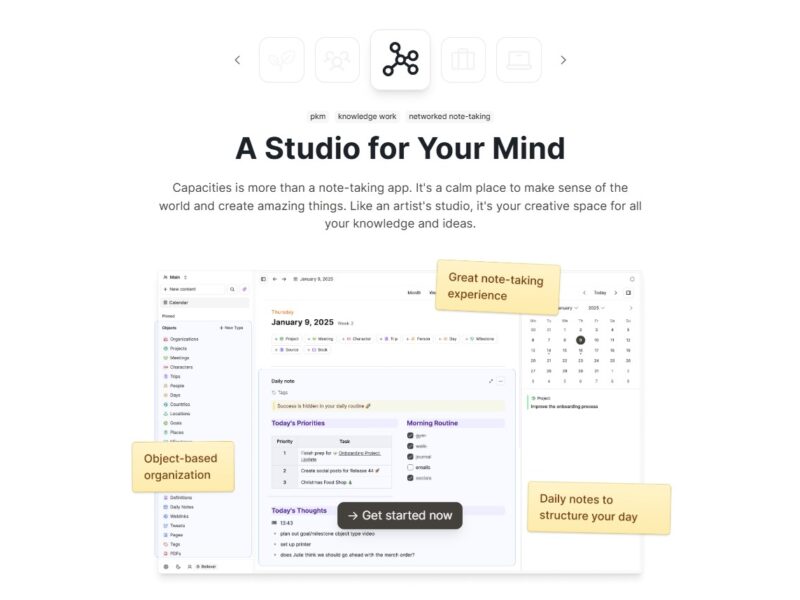
Capacities is an advanced knowledge management platform designed to help businesses streamline their data and internal processes. The tool enables organizations to efficiently capture, organize, and search through their collective knowledge. With its user-friendly interface and powerful capabilities, Capacities aims to optimize workflows, enhance collaboration, and improve knowledge sharing within teams and across organizations.
By centralizing information in one accessible space, Capacities makes it easier for teams to retrieve relevant data, document procedures, and ensure that important knowledge is not lost over time. Whether for a small startup or a large enterprise, Capacities offers a scalable solution to support business growth and operational efficiency.
Features
Capacities is equipped with a wide range of features designed to simplify the knowledge management process. Key features include:
-
Centralized Knowledge Base: All your documents, notes, and workflows are stored in one place, making them easy to access and update.
-
Search and Tagging: Powerful search functionality allows teams to quickly locate information based on keywords or tags, saving time and improving productivity.
-
Custom Workflows: Capacities enables you to build and manage custom workflows, which helps automate repetitive tasks and ensure consistency across your team.
-
Collaboration Tools: It provides features like shared workspaces, team messaging, and real-time updates, fostering seamless collaboration between team members.
-
Templates and Integrations: Users can leverage pre-built templates for different knowledge management tasks and integrate Capacities with other tools like Slack, Google Drive, and more.
-
Access Control & Security: Capacities offers granular access control options, ensuring that sensitive data is only accessible to authorized users.
-
Analytics & Insights: Built-in analytics tools allow businesses to track how knowledge is being used, identify bottlenecks, and improve overall productivity.
Pros & Cons
Pros:
-
User-Friendly Interface: Capacities is easy to navigate, making it accessible for both technical and non-technical users. Its clean and intuitive design allows teams to adopt it quickly.
-
Improved Knowledge Sharing: With features like centralized knowledge base, real-time updates, and collaboration tools, Capacities fosters effective knowledge sharing across teams.
-
Customization: Users can create custom workflows, integrate with various tools, and personalize the platform to fit the needs of their organization.
-
Security & Control: With access controls and data encryption, Capacities provides businesses with peace of mind regarding the safety and confidentiality of their information.
-
Scalable: Capacities is suitable for businesses of all sizes. Whether you’re a small team or a large enterprise, it can scale with your needs.
Cons:
-
Learning Curve: Although the platform is user-friendly, there may be a slight learning curve for new users who are unfamiliar with knowledge management systems.
-
Limited Offline Functionality: Capacities is primarily cloud-based, which means you need an internet connection to access your data. Offline functionality could be limited, which may be a disadvantage for some users.
-
Pricing: While Capacities offers various plans, some smaller businesses may find its pricing structure to be on the higher end, especially when compared to free alternatives.
-
Mobile App Limitations: The mobile experience may not offer the same level of functionality as the desktop version, limiting its usability for on-the-go teams.
Use Cases for Capacities:
Capacities can be utilized in various scenarios across different industries. Some of the most common use cases include:
-
Employee Onboarding: Capacities helps companies create a centralized onboarding hub where new hires can access documents, training materials, and company policies.
-
Project Management: Teams can use Capacities to store and organize project-related documentation, track progress, and collaborate on tasks, ensuring everyone is on the same page.
-
Internal Knowledge Sharing: Capacities helps organizations maintain a repository of internal knowledge, such as best practices, case studies, and troubleshooting guides, which is easily accessible to employees.
-
Customer Support: Support teams can create a knowledge base with frequently asked questions (FAQs), troubleshooting guides, and product manuals to help customers quickly find solutions.
-
Product Development: Capacities can be used to track product development cycles, document design specs, and collaborate on features and updates, streamlining the development process.
Compared to Other Tools
When comparing Capacities to other knowledge management tools like Notion, Confluence, or Evernote, it stands out in several areas:
-
Ease of Use: Capacities is specifically designed to be intuitive and user-friendly. Unlike Confluence or Notion, which may have a steeper learning curve, Capacities focuses on simplicity, making it a great choice for teams that need a straightforward solution.
-
Customization: While Notion allows for a high degree of customization, Capacities also provides flexible workflow customization and integrations that can be tailored to unique business needs.
-
Collaboration Features: Capacities offers advanced collaboration features, including real-time editing, shared workspaces, and team messaging, similar to Confluence. However, Capacities takes it a step further with more robust access control and security options.
-
Pricing: Capacities tends to be on the pricier side when compared to other tools like Evernote, which is free for basic use. However, the comprehensive features that Capacities offers may justify the cost for businesses looking for an all-in-one solution.
Capacities offers a comprehensive knowledge management solution that simplifies the way businesses organize, share, and collaborate on information. With its intuitive interface, powerful search and tagging functionality, and customizable workflows, Capacities is well-suited for businesses of all sizes. While it may not be the cheapest tool available, its robust features and security options make it a strong contender for companies looking to streamline internal processes and improve knowledge sharing.
Overall, Capacities is an excellent choice for businesses that value organization, collaboration, and efficiency.
FAQs
1. What types of businesses benefit from using Capacities?
Capacities is ideal for businesses of all sizes, from startups to large enterprises. It is particularly beneficial for companies looking to improve internal communication, streamline knowledge sharing, and organize project documentation.
2. Can I integrate Capacities with other tools?
Yes, Capacities offers a variety of integrations, including with popular tools like Slack, Google Drive, and more, making it easy to incorporate into your existing workflow.
3. Does Capacities offer a free trial?
Yes, Capacities offers a free trial for users to explore its features before committing to a paid plan. This allows businesses to test out the platform’s capabilities and see if it’s the right fit.
4. Is Capacities suitable for remote teams?
Absolutely! Capacities is designed to enhance collaboration, whether your team is remote, hybrid, or in-office. The platform allows for seamless document sharing, real-time updates, and communication across locations.
5. How secure is Capacities?
Capacities places a strong emphasis on data security. It offers granular access control, encryption, and secure cloud hosting to protect your business data.