
Remaker
What is Remaker AI Portrait?
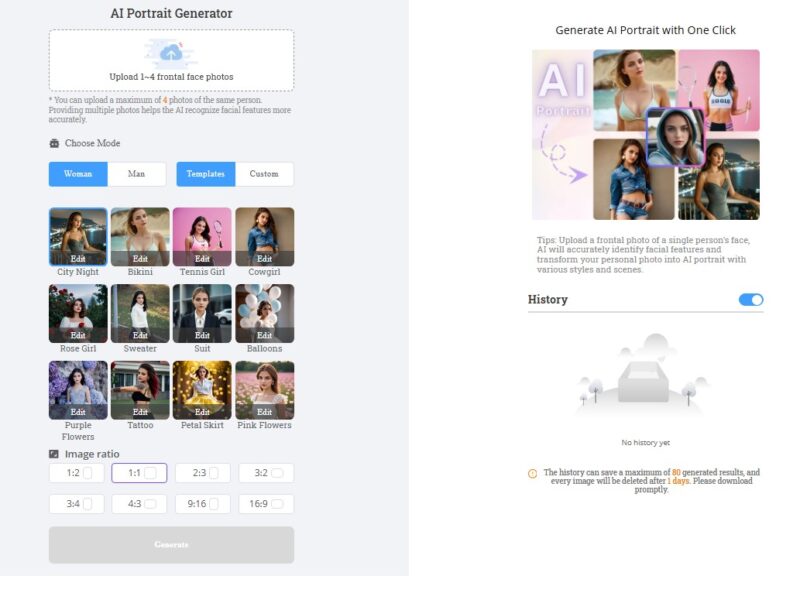
Remaker AI Portrait is an innovative tool designed to transform ordinary photos into high-quality, artistic portraits using artificial intelligence. By leveraging advanced AI technology, Remaker allows users to enhance facial features, adjust lighting, and apply various artistic styles to create professional-looking portraits from standard images. Whether you’re a photographer, content creator, or just looking to elevate your personal photos, Remaker AI Portrait simplifies the process of creating visually striking and customized portraits.
The tool automates many of the tasks involved in portrait enhancement, allowing both beginners and professionals to create stunning, polished images with minimal effort. Remaker provides an intuitive and user-friendly interface, making it accessible to anyone interested in transforming their photos into beautiful works of art.
Features
-
AI-Powered Portrait Enhancement: Remaker uses advanced artificial intelligence to analyze photos and enhance key facial features, such as eyes, skin tone, and hair, to create a more refined and polished portrait.
-
Style Customization: Users can choose from a variety of artistic styles, including classic, modern, and abstract portraits. These styles can be applied to suit personal preferences or brand aesthetics, giving each portrait a unique touch.
-
Automatic Background Removal: Remaker automatically removes or replaces backgrounds to create a clean, professional look. This feature is especially useful for creating profile pictures, marketing materials, or social media content.
-
Facial Feature Enhancement: The AI technology behind Remaker ensures that facial features such as eyes, lips, and skin tone are enhanced, providing a natural yet polished look without appearing overly edited or artificial.
-
High-Resolution Output: Remaker provides high-quality portrait outputs that are suitable for both digital and print use, ensuring your final image looks great on various platforms, from websites to print advertisements.
-
One-Click Editing: With its simple, one-click editing process, Remaker streamlines portrait creation, allowing users to quickly transform their photos without requiring advanced photo editing skills.
-
Real-Time Preview: The tool offers real-time previews, so users can see how their portrait will look after applying different styles and enhancements. This feature helps to refine the result before finalizing the image.
-
Cloud-Based Platform: As a cloud-based solution, Remaker is accessible from any device with an internet connection, eliminating the need for software installations and providing flexibility in how and where you create portraits.
-
Multiple Export Formats: Users can export their portraits in various formats, including JPEG and PNG, ensuring compatibility with a wide range of platforms and devices.
Pros & Cons
Pros:
-
AI-Driven Automation: Remaker automates the process of portrait enhancement, saving users time and effort while producing high-quality results.
-
Wide Range of Styles: The platform offers multiple artistic styles, allowing users to create portraits that match their preferences or brand aesthetic.
-
Easy to Use: The user-friendly interface and one-click editing process make Remaker accessible even to those with no experience in photo editing.
-
Professional Quality: The tool produces high-resolution, polished portraits that are suitable for professional use, whether for personal branding, marketing, or social media.
-
Background Removal: The automatic background removal feature is a time-saver for users looking to create clean, focused portraits.
-
Real-Time Preview: Users can preview their edits in real-time, ensuring that they’re happy with the final result before downloading.
Cons:
-
Limited Advanced Customization: While the tool offers a range of artistic styles and enhancements, users who require highly detailed, custom adjustments may find Remaker’s options somewhat limited compared to professional photo editing software.
-
Dependency on Internet Connection: Since Remaker is a cloud-based tool, a stable internet connection is necessary to use the platform. This can be a disadvantage for users with unreliable internet access.
-
Free Features Limited: While Remaker offers some basic portrait enhancements for free, access to more advanced features and higher-quality outputs requires a paid subscription.
-
Occasional Over-Smoothing: Depending on the chosen style, the AI might over-smooth certain facial features, which could result in a less natural look for some users.
Use Cases for Remaker AI Portrait:
-
Personal Branding: Content creators, influencers, and professionals can use Remaker AI Portrait to create polished, high-quality profile pictures and social media avatars that stand out.
-
E-Commerce: E-commerce brands can use the tool to enhance product photos or create engaging portraits of team members, improving their overall branding and marketing efforts.
-
Photography Enhancement: Professional photographers can utilize Remaker to quickly edit and enhance client photos, offering an efficient and high-quality alternative to manual editing.
-
Social Media Content: Social media managers and influencers can create visually striking portrait-style images for posts, advertisements, and campaigns, helping to engage their audience with compelling visuals.
-
Marketing Materials: Remaker’s high-quality, enhanced portraits are perfect for use in brochures, flyers, banners, and other marketing materials, helping businesses maintain a professional image.
-
Gift Creation: Individuals can use Remaker to create customized portraits for gifts, such as prints, digital images, or framed artwork, making it a thoughtful present for special occasions.
-
Resume and Profile Photos: Users can create professional-looking portrait photos for resumes, LinkedIn profiles, or business websites, helping to create a more polished and attractive presentation.
How Remaker AI Portrait Compares to Other Tools?
Remaker vs. Adobe Photoshop
Adobe Photoshop is one of the most powerful and widely used photo editing tools available, offering extensive features for advanced photo manipulation, retouching, and enhancement. However, Photoshop requires technical skills and can be time-consuming. Remaker AI Portrait, on the other hand, simplifies the process with its one-click editing and AI-driven automation, making it much more accessible to beginners and those who need fast, high-quality results without spending hours on manual editing.
Remaker vs. Fotor
Fotor is another popular photo editing tool that offers portrait enhancement features, including facial retouching and background removal. While Fotor provides some similar features, Remaker AI Portrait stands out for its advanced AI-powered automation, which enhances facial features more naturally and applies artistic styles seamlessly. Fotor offers more manual editing tools, but Remaker’s AI-driven approach makes it a faster, more efficient option for users seeking quick and high-quality results.
Remaker vs. Luminar AI
Luminar AI is a robust AI-based photo editing software designed for photographers, with a broader range of features including sky replacement, object removal, and detailed facial retouching. However, Luminar AI has a steeper learning curve and is geared more toward professional photographers. Remaker AI Portrait is simpler, focusing specifically on portrait enhancement and artistic style application, making it ideal for casual users or those who need a streamlined solution for portrait creation.
Remaker vs. PortraitPro
PortraitPro is a dedicated portrait editing software that specializes in enhancing facial features, adjusting lighting, and retouching skin. PortraitPro offers more detailed manual controls for users who want in-depth customization. In comparison, Remaker automates much of the process with its AI technology, offering a simpler and faster option for users looking for a quick, high-quality result without the need for extensive manual adjustments.
Remaker AI Portrait is an excellent tool for anyone looking to enhance photos and create high-quality, professional-looking portraits with ease. By leveraging the power of artificial intelligence, Remaker streamlines the process of portrait enhancement, offering customizable artistic styles, automatic background removal, and high-resolution output. Its intuitive, one-click editing process makes it ideal for both beginners and professionals alike.
While it may not offer the deep customization options of more advanced photo editing software, Remaker excels in providing a fast, efficient, and accessible solution for creating stunning portraits from ordinary photos. Whether you’re looking to enhance personal photos, create professional branding images, or generate content for social media, Remaker offers an affordable and user-friendly platform to transform your photos into works of art.
FAQs
-
How does Remaker AI Portrait work?
Remaker uses artificial intelligence to enhance facial features, adjust lighting, and apply artistic styles to transform regular photos into high-quality portraits. -
Can I customize the artistic style of my portrait?
Yes, Remaker offers various artistic styles that you can choose from, including classic, modern, and abstract styles, allowing you to create a portrait that suits your personal or brand aesthetic. -
Is Remaker easy to use for beginners?
Absolutely! Remaker’s intuitive, one-click editing process makes it easy for anyone to enhance their photos, even without prior experience in photo editing. -
Can I download my portrait in high resolution?
Yes, Remaker provides high-resolution output suitable for both digital and print use, ensuring your final portrait looks great on any platform. -
Does Remaker offer a free version?
Yes, Remaker offers basic portrait enhancement features for free, but access to advanced features and high-quality exports requires a paid subscription.