
vheer
What is Vheer Image to Video?
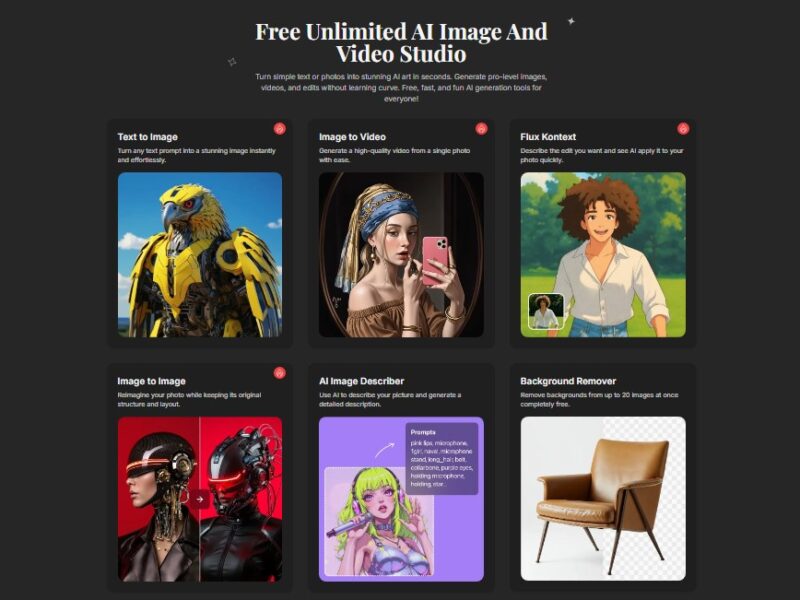
Vheer Image to Video is an innovative tool that allows users to convert static images into dynamic, engaging videos. By utilizing advanced AI-powered technology, Vheer enables the automatic transformation of still images into fully animated video sequences. This tool is ideal for content creators, marketers, and businesses that want to enhance the visual appeal of their digital assets and create more interactive video content from existing photos.
With Vheer, users can easily create compelling video content without requiring advanced video editing skills or expensive software. Whether you need to create promotional videos, social media posts, or slideshows, Vheer’s Image to Video tool streamlines the process of turning static images into moving visuals in just a few simple steps.
Features
-
AI-Powered Image Animation: Vheer uses advanced AI algorithms to analyze and animate static images, adding movement, transitions, and effects to create a more engaging video experience.
-
Customizable Animation Styles: Users can choose from a variety of animation styles and effects to bring their images to life. Whether you want to create a smooth pan or zoom effect or apply a more complex transition, Vheer offers flexibility in how the images are animated.
-
Automatic Scene Transitions: Vheer automatically adds scene transitions, ensuring a smooth flow between images in the final video. This helps maintain viewer engagement and provides a polished, professional look.
-
Customizable Duration and Timing: Users can adjust the length of the video and set the timing for each image transition. This ensures that the final video aligns with your specific needs, whether for social media, presentations, or advertising.
-
High-Quality Output: Vheer supports the generation of high-definition video files, ensuring that your final product retains excellent visual quality, even when shared on platforms like YouTube, Instagram, or Facebook.
-
Multiple File Format Support: Vheer allows users to download videos in various formats, including MP4 and AVI, making it easy to share the final video across different platforms and devices.
-
Intuitive Interface: Vheer is designed with simplicity in mind. Even those without video editing experience can quickly convert images into videos with just a few clicks.
-
Free and Paid Options: While Vheer offers free image-to-video conversion, premium features such as additional animation styles, longer video durations, and high-quality downloads are available with a subscription plan.
-
Cloud-Based Processing: The platform operates entirely in the cloud, meaning you don’t need to worry about installation or hardware limitations. You can access and create videos from any device with an internet connection.
Pros & Cons
Pros:
-
Easy to Use: Vheer is user-friendly, with an intuitive interface that requires no previous video editing skills. It’s perfect for beginners and those who need to quickly convert images into videos.
-
AI-Driven Animation: The tool uses AI to generate dynamic and visually appealing animations, offering a high level of automation and quality.
-
Customizable Video Length and Timing: Users have control over the video’s timing, allowing for greater flexibility in how the final video is structured.
-
Quick Processing: Vheer’s cloud-based system allows for fast video creation, saving users time compared to traditional video editing software.
-
Multi-Platform Compatibility: The output video can be downloaded in multiple formats, making it easy to share and use across various platforms, including social media and websites.
-
Cost-Effective: With both free and paid options, Vheer offers an affordable solution for businesses and individuals looking to create high-quality videos without expensive software.
Cons:
-
Limited Advanced Features: While Vheer is great for basic image-to-video conversion, it lacks advanced video editing tools like complex timeline adjustments, multi-track editing, or detailed effects control.
-
Customization Limits: While there are animation styles and effects to choose from, users may find the level of customization somewhat limited compared to more professional video editing software.
-
Internet Dependency: As a cloud-based platform, Vheer requires a stable internet connection, which may be an issue for users with unreliable or slow internet speeds.
-
Export Restrictions on Free Plan: The free version has limitations in terms of video duration and export quality, with higher-quality downloads and extended features reserved for paid plans.
Use Cases for Vheer Image to Video:
-
Social Media Content Creation: Vheer is perfect for creating engaging content for social media platforms like Instagram, Facebook, and TikTok. Users can turn their photos into animated videos to capture more attention and boost engagement.
-
Marketing and Advertising: Businesses can use Vheer to convert product images or promotional graphics into attention-grabbing video content for ads, email campaigns, or websites.
-
Presentations and Slideshows: Create dynamic slideshows for presentations, making images more engaging by adding smooth transitions, animations, and visual effects.
-
Event and Wedding Videos: Vheer is ideal for creating video montages from photos of events, such as weddings, parties, or corporate gatherings, adding motion and music to create memorable videos.
-
E-Learning and Educational Videos: Teachers, educators, and e-learning creators can use Vheer to animate their lecture slides or educational images, making content more engaging and visually appealing.
-
Real Estate Marketing: Real estate agents can use Vheer to create videos from property photos, adding movement to still images and showcasing properties in a more dynamic way for prospective buyers.
-
Product Demonstrations: E-commerce brands can enhance their product images by transforming them into product demonstration videos, helping potential customers better visualize the items they are purchasing.
How Vheer Image to Video Compares to Other Tools?
Vheer vs. Animoto
Animoto is another popular tool for creating videos from images and video clips. Like Vheer, Animoto provides various templates and customization options to turn static images into videos. However, Animoto’s focus is more on providing templates and design elements for marketing videos, while Vheer is focused on animating images with AI and adding smooth transitions. Vheer’s strength lies in its simple, AI-driven approach, making it easier for users who want quick and automated results without much customization.
Vheer vs. Adobe Spark
Adobe Spark is a powerful tool for creating videos and graphics from photos. It offers more flexibility and control over video creation, including text overlays, voiceovers, and detailed video editing options. While Adobe Spark provides more customization options, it also has a steeper learning curve compared to Vheer. If you need a simple and fast tool for turning images into videos without much manual effort, Vheer may be the better option.
Vheer vs. Kapwing
Kapwing is a versatile online tool for editing videos, including adding images, GIFs, text, and sound to create compelling video content. Unlike Vheer, which focuses on automating the animation of images, Kapwing offers more manual editing features, allowing users to customize video content in greater detail. However, Kapwing can be more time-consuming for users who simply want to animate images quickly, making Vheer a more efficient choice for users seeking simplicity and speed.
Vheer vs. InVideo
InVideo is another video creation tool that allows users to create videos from images, videos, and text. While InVideo offers a wide range of templates, stock footage, and more manual editing features, Vheer focuses exclusively on turning images into animated videos with minimal effort. InVideo may be better suited for users who need a more comprehensive video creation tool with a lot of templates, while Vheer is ideal for users who want a simple, automated process for turning still images into video content.
Vheer Image to Video is an excellent tool for individuals and businesses looking to transform static images into dynamic video content with ease. Its AI-powered animation, customizable video timing, and user-friendly interface make it a perfect choice for marketers, content creators, and anyone who wants to create engaging videos without the need for complex editing tools.
While it may not have the advanced customization and editing features of more professional video creation tools, Vheer’s simplicity and speed make it an invaluable asset for those who need high-quality videos in a fraction of the time. Whether for social media, advertising, or presentations, Vheer helps users elevate their visual content and captivate their audience.
FAQs
-
How does Vheer turn images into videos?
Vheer uses AI technology to animate static images, adding smooth transitions and effects to create engaging video sequences from your photos. -
Is Vheer easy to use for beginners?
Yes, Vheer is designed to be user-friendly and intuitive, requiring no previous video editing experience. You can create videos with just a few clicks. -
Can I use Vheer for free?
Yes, Vheer offers a free version that allows you to convert images into videos, although there are limitations on video length and export quality. Premium features are available with a subscription. -
What video formats does Vheer support?
Vheer supports MP4 and AVI file formats for video downloads, making it compatible with most video players and platforms. -
Can I customize the animation styles in Vheer?
Yes, Vheer offers a variety of animation styles and effects, allowing you to customize how the images are animated and how the video transitions flow.