
ChatPDF
What is ChatPDF?
ChatPDF is a cutting-edge AI-powered tool designed to streamline the way users interact with PDF documents. By integrating advanced natural language processing (NLP) capabilities, ChatPDF enables users to chat directly with their PDFs. Rather than manually reading or searching through documents, users can simply ask questions and receive instant answers—making it an invaluable tool for anyone who works regularly with PDFs.
Whether you’re dealing with complex reports, contracts, academic papers, or other text-heavy documents, ChatPDF empowers users to quickly extract relevant information, clarify sections, and gain insights—saving time and enhancing productivity. The service combines the familiarity of chat-based interfaces with the functionality of sophisticated document analysis.
Features
-
AI-Powered Chat Interface: ChatPDF uses artificial intelligence to allow users to engage in interactive conversations with PDF documents. You can ask questions and the AI will respond with the relevant information from the document.
-
Instant Text Extraction: With ChatPDF, you no longer need to sift through long paragraphs or pages. The AI instantly pulls out key data, summaries, or answers to your questions.
-
Search & Query Functionality: Users can search for specific keywords or phrases in their PDFs, helping them find exactly what they need in seconds.
-
Multi-Language Support: ChatPDF can handle PDFs in various languages, offering a more inclusive tool for global users.
-
Support for Complex Documents: ChatPDF works with a wide variety of PDFs, including those with dense technical language, graphs, and tables, making it ideal for both casual users and professionals.
-
Document Summarization: If you don’t have time to read an entire document, ChatPDF can provide quick summaries to give you an overview of the content.
-
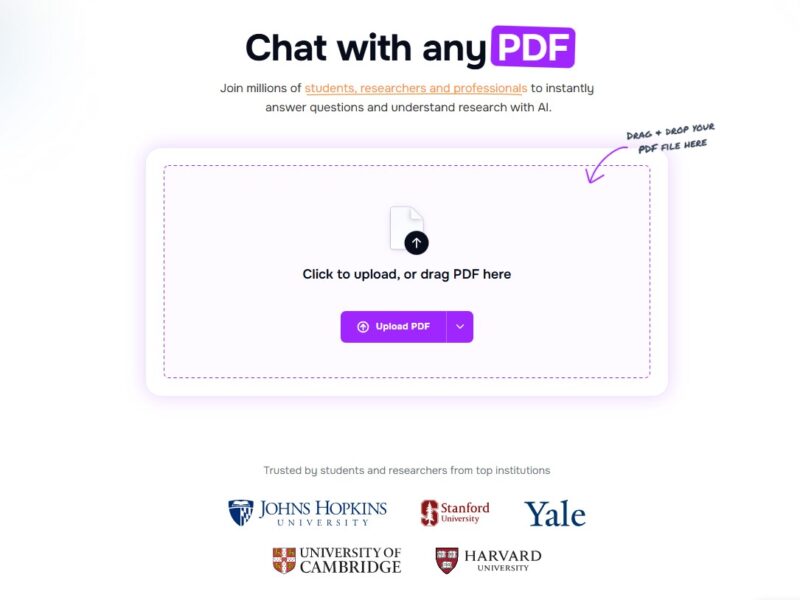
User-Friendly Interface: The platform is designed to be intuitive, with a simple drag-and-drop feature to upload your PDF and start interacting right away.
Pros and Cons
Pros:
-
Time-Saving: ChatPDF significantly reduces the amount of time spent manually reviewing documents by quickly providing answers and summaries.
-
Enhanced Productivity: For professionals who frequently work with lengthy reports or documents, ChatPDF boosts efficiency by allowing for quicker data extraction and decision-making.
-
Intuitive Design: The chat-based interface is easy to use, making it accessible even to those with little technical knowledge.
-
High Accuracy: The AI is trained to accurately interpret context and pull relevant data, making it a highly reliable tool for document analysis.
-
Cross-Platform Accessibility: As a web-based tool, ChatPDF can be used across devices and operating systems, making it convenient for on-the-go users.
Cons:
-
Limited Document Format Support: While ChatPDF works well with most text-based PDFs, it may struggle with complex or poorly formatted documents, such as scanned images or PDFs with a lot of non-text content.
-
Subscription Model: Access to advanced features may require a subscription, which could be a barrier for users who are looking for a free solution.
-
AI Limitations: Although ChatPDF’s AI is robust, it may not always perfectly interpret context or nuances, especially in highly technical or ambiguous documents.
-
Learning Curve for New Users: Some users might take a little time to fully understand the breadth of features and how to interact with the chat interface most effectively.
Use Cases for ChatPDF:
ChatPDF serves a variety of use cases, making it suitable for both personal and professional needs:
-
Legal Professionals: Lawyers and paralegals often work with lengthy legal documents, contracts, and case studies. ChatPDF allows them to quickly extract relevant clauses or sections for review and comparison.
-
Researchers and Academics: Researchers can use ChatPDF to quickly navigate through academic papers, thesis documents, or research studies to find citations, results, or specific theories without sifting through the entire document.
-
Business Analysts: In business, professionals often need to go through reports, market studies, and data-heavy documents. ChatPDF enables quick extraction of insights or key figures, allowing analysts to focus on strategic decision-making.
-
Students: Students dealing with lengthy textbooks, lecture notes, or academic articles can use ChatPDF to quickly understand key concepts, summaries, or answers to specific questions, enhancing their study productivity.
-
Project Managers: For project managers handling project documentation, proposals, and status reports, ChatPDF can streamline information gathering, enabling them to extract relevant data for meetings and presentations faster.
ChatPDF vs. Other Document Interaction Tools
When compared to other document interaction tools, ChatPDF offers distinct advantages, particularly in terms of its AI-driven chat interface and real-time responses. Here’s how it stacks up against some other common tools:
-
Adobe Acrobat Reader: Adobe Acrobat Reader is a well-known PDF tool but lacks the AI-powered features of ChatPDF. Users must manually search through the document or use built-in tools for basic text extraction. ChatPDF provides a more interactive, chat-based approach for streamlined data retrieval.
-
PDF Expert: PDF Expert allows users to annotate and highlight PDFs but doesn’t provide the advanced AI capabilities of ChatPDF. While it’s great for editing and annotating, it doesn’t offer the conversational interaction that ChatPDF provides for quick data extraction.
-
Foxit PDF Reader: Foxit is another popular PDF reader, known for its speed and lightweight performance. However, it lacks the intuitive AI chat interface and natural language querying that ChatPDF offers, which makes ChatPDF a better choice for users who want quick, context-sensitive information from PDFs.
-
SummarizeBot: While SummarizeBot offers document summarization features, it doesn’t provide the level of interactivity that ChatPDF does. ChatPDF’s chat-based system allows users to ask follow-up questions and receive more tailored information on demand.
ChatPDF is a game-changing tool that revolutionizes the way people interact with PDF documents. By integrating AI-powered chat functionality, it allows users to seamlessly extract key information, get quick summaries, and answer specific questions without the need for tedious manual reading. Ideal for professionals, students, and anyone who regularly works with PDF documents, ChatPDF streamlines the entire process, making it an essential tool for enhancing productivity and efficiency.
With its user-friendly design, speed, and intelligent document analysis, ChatPDF is rapidly becoming the go-to tool for anyone seeking a smarter way to interact with PDFs.
FAQs
1. Is ChatPDF free to use?
ChatPDF offers a freemium model. Basic features can be accessed for free, but premium features, including advanced AI functionality, require a subscription.
2. How do I upload a PDF to ChatPDF?
Uploading a PDF to ChatPDF is easy—simply drag and drop your file into the web interface, and the system will instantly process the document.
3. Does ChatPDF support scanned PDFs?
ChatPDF works best with text-based PDFs. Scanned PDFs may not be fully supported unless they are OCR (optical character recognition) processed.
4. Can I use ChatPDF on mobile devices?
Yes, ChatPDF is a web-based tool that is accessible on mobile devices through a browser, providing flexibility for users on the go.
5. What types of documents work best with ChatPDF?
ChatPDF excels with text-heavy documents such as reports, academic papers, contracts, and manuals. However, documents with complex formatting, images, or tables may require more processing time or may not work as well.